![s[3]decode](https://s3decode.com/wp-content/uploads/2026/05/logo-s3decode.png)
AI tools don’t have to come with a $20 or $50 monthly bill to be useful. In fact, some of the most practical AI tools available today cost $10 a month or less and can handle specific tasks surprisingly well.
Whether you want help writing content, generating images, coding, creating voiceovers, researching topics, or getting more done, there are affordable options for almost every workflow. The challenge is figuring out which ones are actually worth paying for.
A low price doesn’t automatically make an AI tool a good deal. Some inexpensive plans come with strict credit limits, restricted features, slower generation, or important capabilities locked behind a more expensive tier. Others may look cheap because their advertised price only applies to annual billing.
That’s why this list isn’t simply about finding the cheapest AI tools under $10. We’re looking at what you actually get for your money, how the tool fits into real-world workflows, what limitations you should know about, and whether the paid plan offers enough value to justify the monthly cost.
In this guide, we’ll explore the best AI tools under $10/month for different needs, from everyday AI assistance and coding to writing, design, voice, research, productivity, and content creation. We’ll also compare their pricing, key capabilities, limitations, and the type of user who will get the most from each tool.
Note: AI pricing and features can change frequently. Some tools also offer different prices depending on monthly versus annual billing, region, or usage. Always check the provider’s current pricing before subscribing.
What Counts as an AI Tool Under $10/Month?
“Under $10” sounds straightforward, but AI pricing can get surprisingly complicated. A tool might advertise a low starting price while reserving its most useful features for a higher plan. Another might only reach the $10 mark when you pay annually.
For this list, we’re using a simple rule: the paid plan must cost $10/month or less under its standard pricing structure, rather than relying on a temporary discount or promotional offer.
Our $10 Pricing Rules
We considered a few things before including a tool:
| Pricing factor | What we count |
| Monthly subscription | $10/month or less |
| Annual billing | Included if the effective monthly cost is $10 or less, clearly marked |
| Free plans | Mentioned separately, but not treated as a paid $10 plan |
| Temporary discounts | Not counted |
| Limited-time promotions | Not counted |
| API pricing | Excluded from the main list |
| Usage credits | Considered when evaluating actual value |
| Regional pricing | Noted where it significantly changes the price |
This distinction matters because $10/month doesn’t always mean unlimited access. Some AI subscriptions work with monthly credits, message limits, generation limits, or other usage restrictions. A tool can therefore be inexpensive but still poor value if you regularly hit its limits.
Cheap Doesn’t Always Mean Good Value
Price is only the starting point. A $5 AI tool that you rarely use may be a worse purchase than a $10 tool that saves you several hours every month.
That’s why we’ll look beyond the subscription price throughout this guide. Each tool is evaluated based on its use case, important features, limitations, usage restrictions, and overall value for the money.
We’ll also separate tools that are genuinely useful at the $10 level from those that simply offer a cheap entry plan designed to get you into a more expensive subscription later.
Quick rule: If the affordable plan doesn’t include the feature most people are paying for, we won’t treat the tool as a strong $10 recommendation.
Pricing and features can change, so prices mentioned in this guide should be checked against the provider’s current pricing page before subscribing.
1. ChatGPT Go
Price: $8/month in the U.S. OpenAI notes that pricing is localized in some markets. There is currently no annual billing option for Go.
Best for: Everyday AI work, writing, learning, brainstorming, file analysis, and image creation
If you want one AI subscription that can handle a little bit of everything, ChatGPT Go is difficult to ignore at this price.
OpenAI launched Go as its lower-cost paid ChatGPT plan, positioning it between the free version and ChatGPT Plus. As of 2026, it is available in all countries where ChatGPT is supported.
What Makes the $8 Plan Different?
The main benefit isn’t simply getting access to ChatGPT. It’s getting higher usage limits for several of the features people already use in the free plan.
According to OpenAI, Go provides more access to messages, file uploads, image generation, data analysis, and memory than the Free tier. OpenAI says the plan provides 10× more messages, file uploads, and image creation compared with Free.
| Feature | ChatGPT Go |
| Monthly price | $8/month in the U.S. |
| Billing | Monthly |
| Messages | Higher access than Free |
| File uploads | Higher access than Free |
| Image generation | Higher access than Free |
| Data analysis | Expanded access |
| Memory | Longer memory |
| Context | Larger context window |
| Projects & custom GPTs | Included, subject to availability |
| API access | Not included |
Where You’ll Get the Most Value
ChatGPT Go makes the most sense when your AI needs aren’t limited to one task.
A marketer could use it to brainstorm campaigns and analyze a spreadsheet. A writer could draft and refine content. A founder could use it for research and business planning. A student could use it for explanations and learning. You can also upload supported documents and use the AI for analysis rather than moving between several different tools.
That’s what makes the $8 price interesting: you’re paying for breadth rather than one specialized capability.
One Important Limitation
Go isn’t simply a cheaper version of Plus with everything included.
Some advanced products and higher-tier features require Plus or another eligible plan. OpenAI also says usage remains subject to plan limits and temporary restrictions during periods of high demand. API usage is billed separately.
So, if you’re a heavy professional user who needs the highest limits or specific advanced features, the $8 plan may eventually feel restrictive.
Is ChatGPT Go Actually Worth $8?
For most casual and moderate AI users: yes.
If you’re currently using the free version and regularly run into limits for images, uploads, or other supported features, Go gives you substantially more room without jumping straight to the $20 Plus plan.
But if you only ask a few questions each week, the free plan may already be enough. The upgrade makes the most sense when you use AI frequently enough for the additional access to save time.
Our verdict: ⭐ Best overall budget AI assistant
At $8/month in the U.S., ChatGPT Go is one of the strongest fits for an article focused on AI tools under $10. Its biggest advantage is simple: one inexpensive subscription can cover writing, brainstorming, learning, analysis, file work, image creation, and everyday problem-solving instead of forcing you to pay for several specialized tools.
2. Google Gemini
Price: Starting at $7.99/month for Google AI Plus in eligible markets; pricing and availability vary by country.
Best for: Google Workspace users, everyday productivity, research, and multimodal AI tasks
If you’re already living inside Google’s ecosystem, Gemini can make more sense than adding another standalone AI subscription. Its biggest advantage isn’t simply the chatbot itself. It’s the combination of AI capabilities with Google’s broader productivity ecosystem.
Why Gemini Is Worth Considering
Gemini is designed for more than answering questions. You can use it to brainstorm ideas, rewrite content, summarize information, analyze material, research topics, and work with different types of inputs.
For someone who uses Google services heavily, that can make the subscription more useful than its headline AI features suggest.
What You Get
| Feature | What it means for users |
| Gemini AI access | Help with writing, research, brainstorming, and analysis |
| Multimodal capabilities | Work with supported text, images, and other inputs |
| Google ecosystem | Fits naturally into existing Google workflows |
| Cloud storage | Included with applicable Google AI plans |
| Higher usage limits | More access than Google’s free tier |
The Catch
The biggest thing to watch is regional pricing.
Google doesn’t offer identical AI plans at the same price everywhere. A plan that falls below the $10 threshold in one country may cost more than $10 in another. That’s why we wouldn’t simply label every Gemini paid plan as an “under $10” option.
Usage limits also vary by plan and feature. If you use Gemini heavily, check exactly what your local subscription includes before comparing it directly with other tools on this list.
Who Should Pay for It?
Gemini makes the most sense if you already use Google’s ecosystem extensively and want AI to become part of that workflow.
If you mainly want a standalone chatbot and don’t use Google’s other services much, there are other options that may offer better value for your particular needs.
Our verdict: ⭐ Worth considering under $10 only where the local Google AI plan actually meets the price requirement. Its ecosystem integration is the main reason to choose it, rather than simply its chatbot functionality.
AI Tools for Writing & Content Creation
You don’t always need a general-purpose chatbot to create content. Dedicated AI writing tools can be more useful when you’re working on marketing copy, blog posts, product descriptions, emails, or social media content and want templates and writing-focused features built into the workflow.
3. Rytr
Price: $9/month on the monthly plan
Best for: Bloggers, marketers, freelancers, and small businesses creating marketing content
Rytr is one of the few AI writing tools that fits neatly into a genuine under-$10 monthly budget. Its paid Unlimited plan is designed for users who want to generate content regularly without paying for an expensive enterprise-focused writing platform.
The interesting part is that Rytr doesn’t try to compete solely as a general chatbot. It focuses heavily on content creation workflows, giving users predefined use cases and writing tones instead of making them build every prompt from scratch.
What Can You Create With Rytr?
Rytr can be used for a range of marketing and business content, including:
- Blog content
- Emails
- Social media copy
- Product descriptions
- Ad copy
- Landing-page content
- Business ideas
- Content outlines
The paid Unlimited plan also includes unlimited AI content generation, one tone-of-voice match, plagiarism checks, custom use cases, and Rytr’s Chrome extension.
The $9 Plan at a Glance
| Feature | Rytr Unlimited |
| Monthly price | $9/month |
| AI content generation | Unlimited |
| Tone of voice matching | 1 tone |
| Plagiarism checks | 50/month |
| Custom use cases | Yes |
| Chrome extension | Yes |
| Pre-programmed tones | 20+ |
| Free plan | Yes |
Rytr also offers a free plan with a monthly character limit, so you can test the platform before committing to the paid version.
Where Rytr Makes Sense
Rytr is particularly useful when you’re producing short- to medium-form marketing content repeatedly.
For example, a small business owner could use it to create product descriptions and promotional copy, while a freelancer could use its templates to speed up repetitive client work.
It can also be useful for overcoming the blank-page problem. Instead of staring at an empty document, you can start with a structured template and then edit the generated copy to match your brand and audience.
What You Shouldn’t Expect
Rytr’s $9 price is attractive, but it doesn’t make the tool a replacement for every premium AI writing platform.
Its strongest value comes from speed and structured content generation, rather than producing a finished piece that can be published without editing. You’ll still want to fact-check information, improve the voice, remove generic phrasing, and add your own expertise.
The Unlimited plan also isn’t unlimited in every aspect. For example, plagiarism checks are capped at 50 per month, while tone-of-voice matching is limited to one tone on this plan.
Who Should Choose Rytr?
Choose Rytr if your main goal is creating marketing content quickly without spending $20–$50 per month on an AI writing platform.
It’s especially well suited to:
Bloggers who need help getting drafts started
Freelancers producing recurring client content
Small businesses creating marketing copy
Marketers handling multiple content formats
Our verdict: ⭐ Best budget AI writing tool
At $9/month, Rytr is one of the clearest examples of an AI subscription that actually fits the under-$10 requirement. It won’t replace a human editor or a more advanced content platform, but for affordable, repeatable content generation, it’s a strong value.
4. QuillBot
Price: $8.33/month when billed annually ($99.95/year); the monthly plan is $19.95/month.
Best for: Paraphrasing, rewriting, grammar improvement, summarization, and polishing existing content
If you’re not looking for an AI that writes everything from scratch, QuillBot takes a different approach. Its strength is improving and transforming text you already have.
That makes it particularly useful for writers, students, marketers, and professionals who frequently need to rephrase sentences, improve clarity, adjust tone, summarize information, or make existing drafts easier to read.
Why QuillBot Stands Out
QuillBot started with paraphrasing and has gradually expanded into a broader AI writing suite. Its Premium plan includes tools for paraphrasing, grammar checking, plagiarism checking, AI detection, summarization, translation, AI chat, and more.
The annual subscription is what brings QuillBot into this under-$10 list. At $8.33 per month, it qualifies on an effective monthly basis, but you’ll need to pay for the full year upfront.
Quick Look at Premium
| Feature | QuillBot Premium |
| Effective monthly price | $8.33/month |
| Billing | Annually |
| Annual cost | $99.95/year |
| Monthly plan | $19.95/month |
| Paraphraser | Unlimited |
| Paraphrasing modes | 9 unique modes + custom modes |
| Summarizer | Up to 6,000 words |
| Plagiarism checker | 25,000 words/month |
| AI Detector | Unlimited |
| AI Chat | Unlimited |
| Image generation | Up to 300/month |
| Translation | 40+ languages |
QuillBot’s current Premium feature set also includes integrations such as Chrome, Edge, Word, macOS, Android, and iOS.
A Good Fit for Editing, Not Just Generation
One of QuillBot’s biggest advantages is that you can start with your own writing.
For example, if you’ve written a paragraph that sounds repetitive, you can use the paraphraser to explore different versions. If the wording is too complicated, you can simplify it. If you’re working with a long piece of information, the summarizer can help reduce it to something more manageable.
This makes it a useful second-pass tool rather than simply another AI content generator.
Where It Falls Short
The biggest catch is the billing structure.
Although QuillBot appears on an under-$10 list at $8.33/month, that price requires an annual commitment. The standard monthly subscription currently costs $19.95, so someone who wants true month-to-month flexibility would not qualify for the $10 budget.
There are also usage limits on some individual Premium features. For example, the current plan includes 25,000 words per month for plagiarism checking and 300 AI image generations per month.
Who Should Choose QuillBot?
QuillBot is a better choice if your workflow involves editing, rewriting, and improving content more than generating complete articles from a blank page.
It’s particularly useful for:
Content writers polishing drafts
Students improving clarity and summarizing material
Marketers adapting copy for different formats
Professionals rewriting emails, reports, and documents
Non-native English writers looking for help with fluency and phrasing
Our verdict: ⭐ Best for rewriting and content refinement
QuillBot qualifies for this list, but with an asterisk: the $8.33 price is only available when billed annually. If you’re comfortable making a yearly commitment, its combination of paraphrasing, grammar, summarization, and other writing tools makes it a strong budget option. If you specifically need a $10-or-less monthly subscription with no annual commitment, skip it.
AI Tools for Coding
5. GitHub Copilot
Price: $10/month for Copilot Pro
Best for: Developers, freelancers, students, and anyone who wants AI assistance directly inside their coding workflow
If you spend a good part of your day writing code, an AI coding assistant can deliver more practical value than a general-purpose chatbot. GitHub Copilot is one of the strongest options at the $10 price point because it works directly inside the development environment rather than forcing you to constantly switch between your editor and a separate AI chat window.
Copilot can help with code completion, explanations, debugging, refactoring, and chat-based coding assistance. It works across supported IDEs and also integrates with GitHub’s broader developer workflow.
What You Get for $10
GitHub currently lists Copilot Pro at $10 per calendar month, making it one of the few established AI coding subscriptions that lands directly on the article’s $10 threshold.
| Feature | Copilot Pro |
| Price | $10/month |
| Billing | Monthly |
| Code completion | Included |
| AI chat | Included |
| IDE integration | Included |
| GitHub integration | Included |
| AI Credits | Monthly allowance |
| Additional usage | Available through usage-based billing |
More Than Autocomplete
Copilot’s usefulness goes beyond predicting the next line of code.
You can describe what you want in natural language and have Copilot help generate functions, explain unfamiliar code, suggest fixes, or work through implementation ideas. It can also use context from your editor and surrounding project information to make its suggestions more relevant.
For example, instead of manually writing a repetitive function and then debugging it, you might ask Copilot to create the function based on your existing project structure and then review the generated code yourself.
That doesn’t eliminate the need for testing or code review. It simply moves some of the repetitive work out of the developer’s hands.
The $10 Catch
There’s one important change worth knowing about before subscribing.
GitHub moved Copilot to usage-based billing in 2026. Paid plans include a monthly allowance of GitHub AI Credits, and users can pay for additional usage after exhausting their included credits.
So while the subscription itself costs $10/month, your actual spending can be higher if you regularly consume more than the included allowance.
For developers who primarily need code completion and moderate AI assistance, that may not be an issue. Heavy users should pay closer attention to their credit usage.
Where Copilot Makes the Most Sense
Copilot is particularly useful when you’re already comfortable coding but want to reduce the amount of repetitive work involved.
The biggest advantage is where the AI lives. Instead of copying code into a chatbot and bringing the answer back into your project, Copilot operates within the tools developers already use.
Should You Pay $10?
If you code regularly, yes, it’s one of the easiest $10 AI subscriptions to justify.
A few hours of saved development time can quickly outweigh the subscription cost. However, don’t treat generated code as automatically correct. GitHub itself recommends using Copilot alongside testing, code review, security tools, and developer judgment.
Our verdict: ⭐ Best AI coding tool at the $10 price point
For developers who want AI assistance without jumping to a $20+ coding subscription, GitHub Copilot Pro is a compelling option. Just keep an eye on AI Credit usage if you use the more advanced features heavily.
AI Tools for Images & Design
6. Leonardo AI
Price: $10/month when billed annually; $12/month on monthly billing
Best for: AI image generation, marketing visuals, product concepts, social media graphics, and creative experimentation
If you need an AI image generator but don’t want to commit to a $20+ creative subscription, Leonardo AI is one of the more interesting budget options.
It isn’t limited to simple text-to-image generation. Leonardo brings image creation, editing, real-time creative tools, personal AI models, and video generation into the same platform. That makes it more useful for people who want to build a repeatable visual workflow rather than generate the occasional AI image.
What $10 Gets You
The Essential plan costs $10/month with annual billing and includes 8,500 Fast Tokens per month, a 25,500-token rollover bank, private generations, enhanced quality settings, unlimited personal collections, and the ability to train up to 10 personal AI models.
| Feature | Leonardo Essential |
| Effective price | $10/month |
| Billing | Annual |
| Fast Tokens | 8,500/month |
| Token rollover | Up to 25,500 |
| Private generations | Yes |
| Personal AI models | Up to 10/month |
| Enhanced quality | Yes |
| Personal collections | Unlimited |
| Concurrent generations | 2 |
| Top-up tokens | Available |
Where Leonardo Is Particularly Useful
Leonardo becomes more interesting when you need consistent visuals, not just random image generation.
A marketer could use it for campaign graphics. A blogger could create featured images and illustrations. A designer could experiment with concepts before moving into a traditional design workflow. A small business could also use it to produce product concepts, promotional visuals, or social content.
Its personal AI model training can be especially useful when you want more consistency across a series of generated assets.
Don’t Ignore the Token System
The $10 subscription doesn’t mean unlimited access to every Leonardo model.
Your Essential plan comes with a monthly Fast Token allowance, and the number of tokens consumed depends on the computational requirements of the generation. More demanding tasks can therefore consume your allowance faster. Leonardo also lets paid users purchase additional top-up tokens if they run out.
That’s an important distinction when comparing Leonardo with genuinely unlimited AI image plans.
And There’s a Free Option
Before paying, you can test Leonardo’s free tier. It currently provides 150 Fast Tokens per day, along with access to a selection of creative features.
For someone who only needs a handful of AI images occasionally, the free plan may be enough. The paid Essential plan makes more sense when you need private generations, higher limits, better controls, or more consistent creative output.
Is Leonardo Worth $10?
Yes, if you create images regularly.
The annual price makes Leonardo a strong choice for creators who want more control than a basic AI image generator provides. However, if you’re looking for unlimited access to every model or generate large volumes of images every day, the $10 tier may feel restrictive.
Our verdict: ⭐ Best budget AI image generator for creators who want more control
The important caveat is the same as QuillBot: the $10 price requires annual billing. If you need month-to-month flexibility, Leonardo’s current Essential plan is $12/month and therefore falls outside this article’s strict $10 monthly limit.
AI Tools for Voice & Audio
7. ElevenLabs
Price: $6/month on monthly billing or $5/month equivalent when billed annually
Best for: AI voiceovers, narration, podcasts, videos, voice cloning, and audio content
Good AI voice generation can be surprisingly expensive, especially when you need realistic speech, multiple languages, or commercial usage. ElevenLabs is one of the exceptions. Its Starter plan brings many of its voice-generation capabilities down to just a few dollars per month.
The platform has also expanded well beyond basic text-to-speech. You can now use ElevenLabs for speech generation, voice design, voice cloning, sound effects, music, dubbing, image and video generation, and other creative workflows.
The Starter Plan at a Glance
| Feature | ElevenLabs Starter |
| Monthly price | $6/month |
| Annual equivalent | $5/month |
| Monthly credits | 30,000 |
| Billing | Monthly or annual |
| Instant Voice Cloning | Yes |
| Commercial License | Yes |
| Studio projects | Up to 20 |
| Dubbing Studio | Included |
| Image & Video | Included |
| Music commercial use | Included |
The 30,000 monthly credits are shared across ElevenLabs’ creative products, so how much you can produce depends on what you use those credits for.
Where ElevenLabs Earns Its Place
For creators, the biggest attraction is still voice quality.
You can turn written scripts into natural-sounding narration without hiring a voice actor for every project. That makes it useful for YouTube videos, online courses, product explainers, podcasts, advertisements, audiobooks, and social media content.
The Starter plan also includes Instant Voice Cloning, which makes it possible to create a usable digital version of a voice from a relatively small amount of source audio.
It Isn’t Just a Text-to-Speech Tool Anymore
This is where ElevenLabs becomes particularly interesting at the $6 price point.
Its platform now combines several audio and creative capabilities. You can generate speech, create sound effects, work with music, isolate voices, change voices, and use dubbing tools. ElevenLabs also offers AI image and video generation within its creative platform.
That doesn’t mean the Starter plan gives you unlimited access to everything. The same credit pool is used across products, meaning generating music, dubbing content, or using other credit-heavy features can consume your allowance considerably faster than ordinary text-to-speech.
One Number to Watch: 30,000 Credits
The $6 price looks attractive, but credits are the real budget constraint.
For text-to-speech, approximately one character consumes one credit on some models, while other products have different credit costs. For example, ElevenLabs currently lists speech-to-text at 330 credits per minute, music at 900 credits per minute, and sound effects at 200 credits per generation.
So a creator producing occasional voiceovers could get substantial value from Starter, while someone generating large volumes of audio every week may quickly need a higher plan or additional usage.
Who Should Pay for It?
ElevenLabs makes the most sense when voice is an important part of your content.
A YouTube creator can turn scripts into narration. A marketer can produce voiceovers for promotional videos. A small business can create explainer content without recording every line manually. Podcasters can experiment with different voices and audio workflows.
If you rarely create audio, however, the free plan may be enough to experiment with before spending anything.
Is ElevenLabs Worth $6?
For creators who regularly need AI-generated voices, absolutely.
At $6/month, the Starter plan is considerably easier to justify than a $20+ subscription, particularly because it includes commercial licensing and voice cloning alongside the core voice-generation capabilities.
Just remember that you’re buying 30,000 shared credits, not unlimited generations.
Our verdict: ⭐ Best affordable AI voice generator
ElevenLabs is one of the strongest examples of how a low-cost AI subscription can still be genuinely useful. For anyone creating videos, podcasts, courses, or other voice-heavy content, $6/month is a relatively small price for a capable AI audio toolkit.
AI Tools for Meetings & Productivity
8. Otter.ai
Price: $8.33/user/month when billed annually
Best for: Meeting transcription, summaries, action items, interviews, sales calls, and team collaboration
How many meetings have you finished only to realize you barely remember what was discussed?
That’s the problem Otter.ai is designed to solve. Instead of trying to take notes while participating in a conversation, you can let Otter record and transcribe the meeting, then turn that conversation into something you can actually use afterward.
It can connect with Zoom, Microsoft Teams, and Google Meet, automatically capture conversations, identify speakers, and generate summaries and action items.
What You Get for $8.33
The Pro plan is priced at $8.33 per user per month when billed annually. It includes 1,200 transcription minutes per month, unlimited meeting history, expanded AI Chat, and up to 10 file imports per month.
| Feature | Otter Pro |
| Effective monthly price | $8.33/user |
| Billing | Annual |
| Transcription | 1,200 minutes/month |
| Meeting history | Unlimited |
| AI Chat | 50 chats/user |
| File imports | 10/month |
| Real-time transcription | Yes |
| Meeting summaries | Yes |
| Action items | Yes |
| Team collaboration | Yes |
What Makes Otter Useful?
The real value isn’t simply getting a transcript.
Otter can turn a long conversation into meeting summaries, decisions, action items, and searchable information. That means you don’t necessarily need to replay a 60-minute meeting just to find the one decision someone made near the end.
Its AI Chat can also help you retrieve information from your meeting history, making previous conversations easier to search and reference.
For a sales team, that could mean quickly finding what a prospect asked for during an earlier call. For a manager, it could mean checking which tasks were assigned during a team meeting. For a freelancer, it could provide a searchable record of client discussions.
A Small Business Use Case
Imagine you’re running a small agency and have five client calls every week.
Instead of meeting, handwritten notes, cleaning up notes, sending follow-up and forgetting half the details, you can use Otter to capture the conversation and generate a usable record.
You can then review the summary, check the action items, and use the transcript when preparing your follow-up. That doesn’t remove the need for human review. But it can eliminate a lot of repetitive note-taking.
The 1,200-Minute Limit Matters
At first glance, 1,200 minutes sounds like a lot. For most individual users, it is.
But businesses with frequent meetings can burn through those minutes quickly. A team running several hours of calls every day may need a higher plan.
The free Basic plan gives you 300 minutes per month, so it’s worth testing your actual meeting volume before committing to Pro.
There’s another pricing detail worth mentioning: $8.33 is the annual-billing price. Otter’s monthly Pro pricing is considerably higher, so someone specifically looking for a month-to-month subscription under $10 won’t qualify.
Who Will Get the Most From Otter?
Otter makes the most sense if meetings are a regular part of your work.
Great fit for:
- Founders and executives
- Sales professionals
- Consultants and agencies
- Remote teams
- Recruiters
- Researchers
- Journalists
- Freelancers conducting client calls
If you only attend a couple of meetings each month, the free plan may be enough.
Is Otter.ai Worth $8.33?
For anyone spending several hours each week in meetings, yes.
The value comes from everything that happens after the meeting. Instead of leaving with scattered notes and a vague memory of what was agreed upon, you have a searchable record, summary, and action items to work from.
The main limitation is the annual commitment and the monthly transcription allowance. Heavy meeting users should calculate their expected minutes before choosing a plan.
Our verdict: ⭐ Best budget AI meeting assistant
Otter is a strong example of an AI subscription that doesn’t need to replace an entire workflow to be valuable. If it saves you even a few hours of note-taking and meeting administration each month, the $8.33 effective monthly cost can quickly pay for itself.
AI Tools for Presentations
9. Gamma
Price: Free plan available and $9 per seat per month when billed annually.
Best for: Presentations, pitch decks, proposals, reports, and visual business documents
Creating a presentation from scratch usually involves two separate jobs: figuring out what to say and making it look good. Gamma combines those steps.
Give it a topic, outline, or existing document, and it can turn that material into a structured presentation with copy, layouts, visuals, and charts. You can then edit the result instead of starting with a completely blank slide deck.
Why Gamma Belongs on a Budget List
Gamma is interesting because you don’t necessarily need to pay anything to start using it.
Its free plan lets users create presentations, documents, websites, social content, and images, and it supports importing PDFs and PowerPoint files. You can also export content to PDF, PowerPoint, PNG, and Google Slides.
That makes Gamma particularly useful for someone who creates presentations occasionally and doesn’t want another monthly subscription.
From Idea to Presentation
You can begin with a simple prompt, paste an outline, or upload an existing document. Gamma then handles much of the initial structure and visual formatting.
For example, a founder preparing an investor pitch could provide the company’s business model, market information, product details, and financial highlights. Gamma can turn that raw material into a presentation structure that can then be refined manually.
The important word here is draft. AI-generated slides should still be checked for incorrect claims, awkward wording, missing context, and poor storytelling.
What You Can Create
Gamma has expanded beyond traditional slide decks. Its platform now supports:
| Use case | What Gamma can create |
| Presentations | Pitch decks, keynotes, sales presentations |
| Documents | Reports, proposals, white papers, business plans |
| Websites | Shareable AI-generated websites |
| Social media | Platform-ready visual content |
| Graphics | Infographics and illustrations |
This broader approach makes Gamma more useful than a presentation-only generator. A single piece of content can also become the starting point for another format, such as turning a presentation into a document or social asset.
The Free Plan Is the Real Budget Advantage
For this particular article, Gamma’s free tier is worth highlighting.
You can create up to 10 slides per prompt, import existing PDFs and PPTX files, and export your work in several formats without paying for a subscription.
If you only create a presentation once in a while, paying for an AI presentation tool may not make financial sense at all.
The paid tiers become more useful when you need higher generation limits, advanced image models, branding controls, analytics, custom fonts, or other professional features. Gamma’s current pricing structure includes monthly AI-credit allowances on paid plans.
Where Gamma Can Save You Time
Gamma is most valuable when speed matters more than pixel-perfect control.
A marketer can quickly turn campaign information into a client presentation. A salesperson can create a proposal from existing material. A founder can build a first version of a pitch deck without spending hours adjusting layouts.
You still need to bring the strategy, facts, and final judgment. Gamma mainly removes much of the repetitive formatting work.
One Limitation to Remember
AI-generated presentations can look polished while still being strategically weak.
A beautiful deck won’t fix a confusing argument, unsupported statistics, or an unclear value proposition. Gamma can help structure and present information, but you should treat its output as a starting point rather than a finished presentation.
Also, if you need highly customized corporate branding, advanced analytics, or larger AI usage, you’ll likely need to move beyond the free tier.
Is Gamma Worth Paying For?
For occasional users, start free.
That’s actually one of Gamma’s biggest advantages for a $10-budget article. You can test whether it genuinely improves your workflow before adding another subscription to your monthly expenses.
For frequent presentation creators, the paid plans can make sense when the additional AI usage and professional features justify the cost.
Our verdict: ⭐ Best AI presentation tool to try before paying
Gamma isn’t necessarily the tool you need to subscribe to immediately. Its free tier is capable enough for occasional presentations, while the paid plans become valuable once presentation creation becomes a regular part of your workflow.
AI Tools for Research
10. Perplexity
Price: Free for the standard plan; $10/month for Education Pro with verification. Standard Perplexity Pro costs $20/month, so it does not qualify for the general under-$10 category.
Best for: Web research, fact-checking, source discovery, market research, and answering questions with citations
If your biggest problem isn’t writing but finding reliable information quickly, Perplexity is worth knowing about.
Unlike a traditional chatbot that may answer from its model knowledge, Perplexity is built around web search. It searches online sources and presents answers with citations, making it easier to investigate a topic and trace information back to where it came from.
The Free Plan Is Surprisingly Capable
You don’t necessarily need a subscription to get value from Perplexity. The free Standard plan provides practically unlimited basic searches, a limited number of Pro Searches, basic file uploads, search history, Collections, and other core features.
For someone researching occasional blog topics, competitors, products, or general questions, that can be enough. The paid plans become more relevant when research is a major part of your daily workflow.
What Makes Perplexity Different?
The key advantage is source-backed research.
Ask a question and Perplexity searches the web, synthesizes information, and provides citations alongside the answer. Pro also gives users access to advanced models from providers such as OpenAI, Google, Anthropic, xAI, and others.
That makes it useful for questions where current information matters. For example, instead of asking:
“What are the best AI coding tools?”
you can ask Perplexity to compare current tools, pricing, features, limitations, and recent product changes, then inspect the sources behind the answer.
That second step is important. Citations make research easier to verify, but they don’t make every AI-generated claim automatically correct.
Education Pro: The $10 Exception
For verified students and educators, Perplexity offers Education Pro at $10/month. It includes Pro-level capabilities plus features such as Learn Mode and unlimited Pro Searches.
So if you’re a student or educator, Perplexity can genuinely fit into a $10/month AI budget.
For everyone else, however, the standard Pro subscription currently sits at $20/month. That’s why this article shouldn’t label Perplexity Pro itself as an under-$10 tool.
When Free Perplexity Is Enough
You probably don’t need to pay if you’re mainly using Perplexity for:
- Quick research
- Finding sources
- Checking current information
- Exploring unfamiliar topics
- Occasional fact-checking
- Basic file analysis
The free plan already covers a substantial portion of this workflow.
When Paying Starts to Make Sense
A paid plan becomes more attractive when you’re doing serious research every day and need higher limits, advanced models, deeper research capabilities, more file analysis, and additional creation features.
Perplexity Pro currently includes extended access to Pro Search, Research, advanced models, image and video generation, and increased file and attachment limits.
There’s also a newer consideration: Perplexity’s Computer feature uses a separate credit system for multi-step tasks. Perplexity says 100 Computer credits currently equal $1, although credit usage and allowances can change by plan and region.
Is Perplexity Worth $10?
For students and educators, yes. For everyone else, use the free plan unless you actually need Pro.
That’s the honest answer for an under-$10 roundup.
Perplexity is one of the most useful research-focused AI platforms available, but its standard paid plan doesn’t meet the article’s $10 ceiling. The free version is therefore the better recommendation for general readers, while Education Pro is the legitimate $10 option for eligible users.
Our verdict: ⭐ Best free AI research tool; best $10 option for verified students and educators
Don’t subscribe simply because you’re building a cheap AI stack. Start with the free version. If your research workload grows enough to justify Pro, then the $20 subscription can make sense but it belongs in a different budget category.
AI Tools for Productivity
11. Notion
Price: Free plan available; Plus starts at $10/member/month, but full Notion AI is included with Business and Enterprise rather than the $10 Plus plan. Free and Plus users get limited AI trial usage.
Best for: Organizing projects, notes, content calendars, documentation, tasks, and team knowledge
Notion is slightly different from most tools on this list. It’s not primarily an AI chatbot. It’s a workspace where you can keep your projects, notes, databases, documents, tasks, and team information and then use AI within that environment.
That distinction matters.
If you’re already switching between a notes app, project management tool, content calendar, and AI chatbot, Notion can bring much of that workflow into one place.
What Can You Actually Do With Notion?
Notion can handle everything from a simple personal task list to a fairly sophisticated content or business workspace.
For example, a content team could use it to manage, Ideas, content briefs, article drafts, SEO checklists, publishing status, content calendar and many more.
The AI features can then help generate or edit documents, autofill databases, answer questions about workspace information, and work with information from connected tools, depending on the plan. That’s where Notion becomes more interesting than a standalone AI writing tool.
The $10 Catch
If you’re specifically looking for AI for $10/month, don’t assume that buying Notion Plus for $10 gives you unlimited Notion AI.
It doesn’t.
Notion’s current pricing lists Plus at $10 per member/month, while full Notion AI capabilities are available on Business and Enterprise. Free and Plus plans provide limited complimentary AI usage so users can try the features.
So for this particular roundup, Notion is best treated as an affordable productivity workspace with AI access, rather than one of the strongest standalone $10 AI subscriptions.
Where Notion Still Delivers Value
The biggest advantage is consolidation.
Instead of paying separately for a project-management platform, documentation tool, database, notes app, and AI assistant, Notion can cover several of those jobs in one workspace.
Its free plan already includes databases, project organization, basic sites, calendar integration, and limited AI trials. Plus adds features such as unlimited collaborative blocks, unlimited file uploads, custom forms, charts, and basic connections to tools such as Slack and Google Drive.
For an individual founder, freelancer, marketer, or small team, that can be more valuable than another standalone AI subscription.
A New Angle: Notion Agents
Notion has also moved beyond simple AI writing assistance.
Its newer Custom Agents are designed to handle repetitive, multi-step work across Notion and connected tools. They can run on schedules or triggers and use Notion’s credit system based on the amount of work they perform.
However, these aren’t part of the basic $10 Plus subscription. Custom Agents use Notion credits and are positioned as an add-on for Business and Enterprise plans. Notion currently lists monthly credits at $10 per 1,000 credits.
That makes them interesting for businesses, but not something to count toward a strict $10/month personal AI budget.
Who Should Use Notion?
Notion makes the most sense if your problem is organization rather than simply generating more AI text.
Choose it if you want one place to manage projects, build databases, document processes, organize content, track tasks, and keep company knowledge.
If you only want an AI chatbot or writing assistant, there are better options on this list.
Our verdict: ⭐ Best budget productivity workspace with AI features
Worth knowing: Notion is excellent for consolidating your workflow, but its full AI capabilities don’t fit the article’s strict $10 paid-AI threshold. For a true $10 AI subscription, tools such as ChatGPT Go, Rytr, GitHub Copilot, or ElevenLabs offer a clearer fit.
AI Tools for Design
12. Canva
Price: Free plan available; Canva Pro is typically around $15/month for individuals, so it doesn’t qualify as a standard paid under-$10 option.
Best for: Social media graphics, presentations, marketing materials, thumbnails, simple videos, and everyday design
Canva is another tool that’s worth mentioning even though its full paid plan doesn’t fit neatly into the $10 limit.
Why include it? Because you can get a surprising amount of AI-powered design work done without paying for a premium subscription at all.
Instead of using a separate AI image generator, presentation maker, social media editor, and basic video tool, Canva brings many of those jobs into one visual workspace.
What Can You Do With Canva’s Free Plan?
For someone trying to keep their monthly AI spending close to zero, Canva’s free plan is a practical starting point.
You can create presentations, social posts, documents, videos, thumbnails, flyers, and other marketing assets. Canva also provides access to a selection of AI-powered features, although usage and availability depend on the feature and plan.
This makes Canva particularly useful for small businesses and solo creators who need design output more than advanced AI generation.
Where Canva Saves You Money
Imagine you’re running a small business and need:
- Instagram posts
- LinkedIn graphics
- Blog images
- Presentation slides
- YouTube thumbnails
- Simple promotional videos
- Branded templates
You could subscribe to several specialized tools to handle those jobs. Or you can start with Canva and keep your design workflow in one place. That’s the real value proposition.
Canva isn’t necessarily the most powerful AI image generator or video editor in every category. Its strength is that design, templates, branding, editing, and AI-assisted creation sit together in one workflow.
The $10 Problem
There’s an important distinction for this article.
Canva is useful for a $10-or-less AI stack, but Canva Pro shouldn’t be presented as a $10/month subscription unless a specific regional or promotional price genuinely qualifies.
Pricing can vary by market, billing cycle, and plan, so check Canva’s current pricing before purchasing.
For a strict budget, the smarter approach is to use Canva’s free tier alongside one paid AI tool that fills a capability gap you actually have.
For example:
ChatGPT Go + Canva Free
can cover a surprisingly broad workflow for a solo marketer: generate ideas and copy with the AI assistant, then turn the output into social graphics, presentations, or marketing materials in Canva.
Who Should Use Canva?
Canva is a particularly strong choice for people who don’t consider themselves designers.
You don’t need to understand Photoshop, Illustrator, typography systems, or complex video-editing timelines to produce something professional-looking. That’s why it’s useful for founders, marketers, freelancers, teachers, creators, and small businesses that need good-enough design quickly rather than complete creative control.
Our verdict: ⭐ Best free design companion for a budget AI stack
Budget tip: Don’t buy Canva Pro simply because you’re building an AI toolkit. Start with the free plan and upgrade only when you repeatedly hit a feature, asset, brand, or usage limitation that actually affects your workflow.
The 5 Best AI Tools Under $10/Month
Not every tool on this list deserves the same place in your budget.
A $6 AI voice tool can be a better investment than a $10 writing assistant if you use it every day. Likewise, a free research tool may be more valuable than a paid one if your research needs are occasional.
So instead of ranking these tools purely by price, we’re looking at what you get for the money, how often you’ll use it, how much work it can replace, and whether the cheaper plan is actually usable.
1. ChatGPT Go – Best Overall
Price: $8/month in the U.S.
If you only want to pay for one AI tool, ChatGPT Go is the easiest recommendation for most people.
It covers a wide range of tasks instead of locking you into one specific workflow. You can use it for writing, brainstorming, learning, file analysis, image generation, data analysis, planning, and everyday problem-solving.
The biggest advantage is versatility. Rather than paying separately for an AI writer, research assistant, brainstorming tool, and general chatbot, you can use one subscription across multiple types of work.
Why it ranks #1: The widest range of everyday use cases for less than $10.
2. GitHub Copilot – Best for Developers
Price: $10/month
For developers, GitHub Copilot is arguably the strongest specialized option at this price.
It works directly inside the coding workflow, helping with code completion, explanations, debugging, refactoring, and AI-assisted development. That means you’re not constantly moving code between your editor and a separate chatbot.
The important catch is that Copilot’s newer usage-based model means your $10 subscription comes with a monthly AI credit allowance, while additional usage can incur extra charges.
Why it ranks #2: If you write code regularly, the time saved inside your development environment can easily justify the subscription.
3. ElevenLabs – Best for AI Voice
Price: $6/month
ElevenLabs is one of the clearest examples of an AI subscription that doesn’t need to cost $20 or more.
Its Starter plan gives you a monthly pool of credits for AI voice generation and includes features such as Instant Voice Cloning and a commercial license. It also extends beyond basic text-to-speech into tools for dubbing and broader audio and creative workflows.
For YouTube creators, marketers, podcasters, course creators, and businesses producing voice content, that makes the $6 plan particularly attractive.
Why it ranks #3: Low entry price with a focused feature set that can replace a more expensive voice-production workflow.
4. Rytr – Best for Budget Content Creation
Price: $9/month
Rytr is a better fit for people who want an AI writing tool specifically for marketing and content tasks.
It can help with blog content, social media copy, emails, product descriptions, ads, and other marketing formats. The $9 Unlimited plan is particularly appealing if you generate a high volume of shorter-form content.
It isn’t trying to be everything. That’s actually part of its appeal.
If you already have your research and editing process figured out and simply want an affordable writing assistant, Rytr keeps things straightforward.
Why it ranks #4: A simple, inexpensive writing-focused subscription without requiring a $20+ general AI plan.
5. Leonardo AI: Best for AI Images
Price: $10/month when billed annually
Leonardo AI makes the most sense for users who regularly need original visual content.
Its Essential plan provides a monthly Fast Token allowance, private generations, personal AI model training, enhanced quality, and other creative features. The token system means your actual usage matters, though, so heavy users can burn through a budget faster than expected.
The annual-billing requirement is important here. Leonardo’s monthly price is higher than $10, so it only qualifies under this article’s definition when you commit to annual billing.
Why it ranks #5: Strong value if AI image generation is a regular part of your workflow.
Quick Comparison
| Rank | Tool | Price | Best For | Biggest Advantage |
| 1 | ChatGPT Go | $8/mo | Everyday AI | Most versatile |
| 2 | GitHub Copilot | $10/mo | Coding | AI inside your development workflow |
| 3 | ElevenLabs | $6/mo | Voice & audio | Strong AI voice capabilities at a low price |
| 4 | Rytr | $9/mo | Writing | Affordable content generation |
| 5 | Leonardo AI | $10/mo annually | Images | Powerful AI image creation |
The Bigger Takeaway
The best AI tool under $10 isn’t necessarily the one with the most features. It’s the one you’ll actually use enough to recover the subscription cost.
If you’re a developer who spends several hours a week coding, Copilot may provide more value than ChatGPT Go. If you’re producing videos, ElevenLabs could be the obvious choice. And if you only need occasional AI assistance, a free tool may be a better deal than any paid subscription.
The $10 AI Test: Is a Cheap AI Subscription Actually Worth It?
A $10 AI subscription sounds inexpensive. But five $10 subscriptions are still $50 a month.
That’s why the real question isn’t whether an AI tool is cheap. It’s whether the tool creates enough value to justify another recurring subscription. Before paying, run every AI tool through this simple $10 AI test.
1. Does It Save You Enough Time?
Start with the most obvious question: How much work does this tool remove? If an AI writing tool saves you three hours every month, a $9 subscription may be easy to justify.
But if you use it twice a month to generate something you could create yourself in five minutes, you’re probably paying for convenience rather than meaningful productivity.
Think in terms of time saved per dollar, not features per dollar.
2. Can It Replace Another Tool?
This is where inexpensive AI subscriptions become much more valuable.
Suppose you’re paying separately for:
- A basic writing assistant
- A transcription service
- An image generator
- A presentation tool
If one affordable AI platform can replace one of those subscriptions, you’re not really adding another expense. You may actually be reducing your software budget.
This is particularly useful for small businesses and freelancers that don’t have room for a large collection of specialized subscriptions.
3. Will You Use It Every Month?
Don’t confuse “This tool is useful” with “I need a subscription.”
Some AI tools are excellent but only useful occasionally. For example, you might need an AI presentation tool when preparing a pitch deck but have no use for it during the next three months. In that situation, paying every month may not make sense.
Before subscribing, estimate your actual usage:
| Usage | $10 subscription verdict |
| Almost every day | ✅ Strong candidate |
| Several times a week | ✅ Usually worthwhile |
| A few times a month | ⚠️ Depends on the workflow |
| Once a month | ❌ Consider the free plan |
| Only for occasional projects | ❌ Pay only when necessary if possible |
4. Does the Cheap Plan Include the Feature You Actually Need?
This is the trap many buyers miss. A tool can advertise a $9 or $10 starting price while putting the feature you actually want behind a more expensive plan.
Before subscribing, check: What exactly am I buying at $10?
Look at generation limits, AI credits, file limits, commercial-use rights, integrations, export options, model access, and usage restrictions. There’s no point buying a $10 plan if you immediately need to upgrade to $20.
5. What Happens When You Hit the Limit?
Cheap AI plans increasingly use credits, usage allowances, or metered access rather than simply giving you unlimited access. That isn’t necessarily bad. It just means the headline subscription price doesn’t tell the whole story.
For example, an AI image generator might cost $10 but give you a limited number of generations. A coding assistant may include a monthly allowance and charge for additional usage. A voice tool may give you a fixed number of characters or credits.
So ask: How much AI usage do I actually get for my $10?
That’s often a more useful comparison than the subscription price itself.
6. Is It Still Worth It Without the “Premium” Features?
Try using the free version first whenever possible. If the free plan already handles 80% of what you need, upgrading may not produce enough additional value.
On the other hand, if you’re constantly hitting limits, losing access to important models, or manually working around missing features, the paid plan may quickly pay for itself.
A Simple ROI Formula
You don’t need complicated calculations.
Use this:
Monthly value created − monthly subscription cost = approximate AI ROI
For example, if a $9 writing tool saves you two hours every month and your time is worth $25/hour:
2 × $25 = $50 of potential time value
Subtract the $9 subscription:
$50 − $9 = $41
That’s a much better reason to subscribe than simply saying, “It’s only nine dollars.”
The Bottom Line
A cheap AI subscription is worth paying for when it becomes part of your regular workflow. If it saves meaningful time, replaces another subscription, or helps you produce something you couldn’t easily create yourself, $10 can be excellent value.
If you’re subscribing because the tool looks interesting but don’t have a recurring use case, keep the money and use the free plan instead. The cheapest AI stack isn’t the one with the most $10 subscriptions.
It’s the one that gives you the most useful output with the fewest subscriptions.
What $10 AI Tools Usually Don’t Give You
Getting useful AI for $10 or less is possible. But there’s usually a tradeoff.
The lower price isn’t magic. AI companies have to control compute costs somehow, which means cheaper plans often come with limits on usage, models, credits, speed, or premium features.
That doesn’t make them bad plans. It simply means you need to know where the ceiling is before you subscribe.
1. Unlimited Usage Isn’t Really Unlimited
Some tools advertise generous or unlimited access, but that doesn’t necessarily mean you can use every feature without restrictions.
You may have unlimited access to basic generations but a limited number of premium model requests, advanced searches, image generations, or other resource-intensive features.
For example, a writing tool might allow unlimited text generation while restricting plagiarism checks or other premium features. An image platform may give you a fixed monthly token allowance instead.
Always look at what is actually unlimited.
2. Premium Models May Be Restricted
The cheapest tier doesn’t always include the company’s most capable models. You might get access to a standard model while advanced reasoning, higher-quality generation, faster models, or third-party models are reserved for more expensive plans.
This matters particularly with general-purpose AI assistants because the difference between models can become noticeable when you’re working with complex documents, coding problems, research, or long instructions.
If you only need basic AI assistance, the cheaper model may be perfectly adequate.
3. Credits Can Disappear Quickly
Credit-based pricing is becoming increasingly common across AI products. Instead of simply giving you a number of messages, a platform may give you a monthly pool of credits that gets consumed differently depending on what you do.
A simple text request might cost very little, while generating an image, video, voice recording, or running a more advanced AI task could consume considerably more. That’s why two tools with the same $10 price tag can offer very different amounts of usable AI.
4. Generation Speed May Be Lower
Cheap plans can also come with slower processing or lower priority during periods of high demand. That’s rarely a problem when you’re casually experimenting.
But if you’re generating dozens of images, processing large files, or relying on AI during a time-sensitive work project, waiting for results can become frustrating. For occasional users, slower generation may be a perfectly reasonable tradeoff for a lower monthly bill.
5. Advanced Features May Be Locked
A budget subscription may give you the core product while leaving some of the more interesting features for higher tiers.
Depending on the tool, those could include:
- Advanced integrations
- Larger file limits
- Higher-quality exports
- Team collaboration
- Custom branding
- Automation
- Priority support
- Larger context or usage limits
- Advanced analytics
The important thing isn’t whether the $10 plan has fewer features. It’s whether it has the features you actually need.
6. Heavy Users Can Outgrow the Plan
A $10 subscription can work brilliantly when you’re a moderate user.
Then your workload increases. Suddenly you’re hitting usage limits every few days, buying additional credits, or upgrading to a $20 or $30 plan.
This is especially important for developers, content teams, designers, and creators who use AI throughout the day. A cheap plan is valuable when it matches your workload. Once your usage consistently exceeds the plan’s allowance, the economics change.
7. Commercial Rights Need a Closer Look
If you’re using AI for a business, don’t look only at the subscription price. Check the plan’s terms around commercial use, ownership, licensing, attribution, and generated content.
This is particularly important for AI-generated images, voice, music, video, and other creative assets. A $6 tool isn’t necessarily cheaper if you later discover that the feature you need for commercial work requires a more expensive plan.
The Real Cost of a $10 AI Tool
Here’s the easiest way to think about it:
Subscription price ≠ total value.
A $6 tool with restrictive limits can be worse value than a $10 tool you use every day. Likewise, a $10 subscription you barely use is more expensive in practical terms than a free tool that handles your needs perfectly well.
| What to check | Why it matters |
| Usage limits | Determines how much AI you can actually use |
| Credits | Shows how quickly expensive tasks consume your allowance |
| Model access | Affects quality and capability |
| Speed | Matters for high-volume workflows |
| File limits | Important for research and document-heavy work |
| Integrations | Determines how well it fits your existing workflow |
| Commercial rights | Critical for business and client work |
| Extra usage costs | Prevents unexpected bills |
| Upgrade requirements | Shows whether $10 will really be enough |
The Bottom Line
The best budget AI tools aren’t necessarily the ones with the longest feature lists. They’re the ones where the limitations don’t interfere with what you actually want to accomplish.
If you’re a casual user, a $10 plan can give you plenty. If you’re a heavy AI user, you may quickly discover that paying a little more provides significantly more value. And that’s where the next comparison becomes useful: what do you really get when you move from a $10 AI subscription to $20 or even $50?
$10 vs $20 vs $50 AI Subscriptions: What Are You Really Paying For?
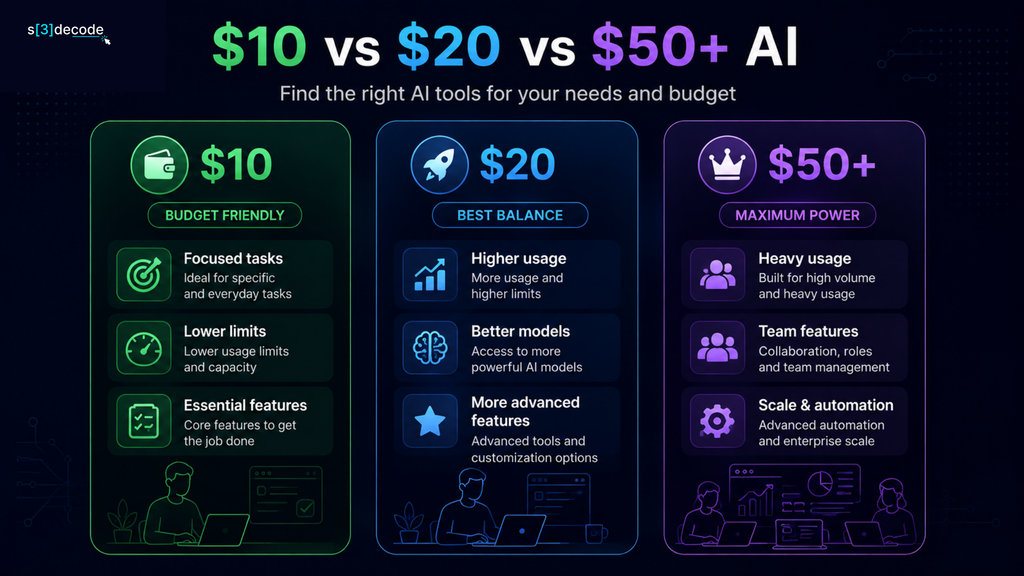
A higher-priced AI subscription isn’t automatically a better deal.
The real difference usually comes down to usage limits, model access, advanced features, speed, and how deeply the tool fits into your workflow. For someone who asks an AI tool a few questions a day, moving from $10 to $20 may add little value. For a developer, content team, or heavy AI user, that extra $10 or $40 can make a meaningful difference.
Here’s a simple way to think about the three price ranges:
| Monthly Budget | Best For | What You Usually Get |
| $0–$10 | Casual users, beginners, focused tasks | Core AI features, lower limits, fewer premium capabilities |
| $10–$20 | Regular professionals | Higher usage, better models, more features and integrations |
| $20–$50+ | Power users and teams | Higher limits, advanced models, automation, collaboration and specialized features |
Under $10: Enough for Most Specific Tasks
The biggest advantage of the under-$10 category is that you can solve a particular problem without committing to an expensive AI stack.
For example, ChatGPT Go costs $8/month in the U.S., while GitHub Copilot Pro costs $10/month. ElevenLabs starts at $6/month, and tools such as Gamma can also fall below the $10 mark depending on billing.
At this level, you’re generally buying focused usefulness rather than unlimited access to everything. If you only need AI for writing, coding assistance, presentations, voiceovers, or everyday research, that’s often enough.
The catch is that you’ll notice limits sooner if you’re a heavy user. Credits, premium model access, file limits, generation limits, or advanced features may become the deciding factor.
Around $20: The Professional Sweet Spot
The $20 range is where many AI subscriptions start targeting people who use AI as part of their daily work. For example, ChatGPT Plus is currently $20/month and provides broader model and tool access than the free plan.
At this level, you’re less likely to choose a tool simply because it can perform a task. You’re paying for more capacity and a better overall workflow.
A $20 plan can make sense when you regularly:
- work with large or multiple files
- use advanced AI models
- generate content or images frequently
- need deeper research capabilities
- rely on AI throughout the workday
- want access to features that aren’t available on cheaper plans
But there’s an important question to ask before upgrading: Are you actually hitting the limits of the $10 plan?
If the answer is no, paying twice as much may simply give you features you rarely use.
$50+: You’re Paying for Scale
Once AI subscriptions reach $50 or more per month, the conversation changes.
These plans are usually aimed at power users, professional creators, teams, or businesses that need significantly more capacity or collaboration features.
Descript, for example, currently lists its Business plan at $50 per person per month on monthly billing. It includes 40 media hours and 1,500 AI credits per month, along with team-focused capabilities.
Similarly, higher GitHub Copilot tiers are designed for users who need substantially larger AI-credit allowances. Copilot Pro is $10/month, while Pro+ is $39 and Max is $100/month.
That’s the key difference: you’re not necessarily paying for an AI that is 5× smarter. You’re often paying for more usage, more control, and fewer restrictions.
So, Which Price Range Should You Choose?
Think about your actual usage rather than choosing based on the feature list.
Casual AI user: Stay around $0–$10.
You write occasional emails, brainstorm ideas, summarize documents, create a few images, or use AI for personal productivity. A budget subscription can be more than enough.
Regular professional: Consider $10–$20.
You use AI every day and depend on it for meaningful parts of your work. Higher limits and better access can save enough time to justify the additional cost.
Heavy or business user: $20–$50+ may make sense.
You’re generating content at scale, coding for hours, producing videos, running research workflows, or collaborating with a team. At this point, limits can become more expensive than the subscription itself.
The Best Upgrade Is the One You Actually Need
There’s a simple rule worth remembering: Don’t upgrade because a more expensive AI plan has more features. Upgrade because the cheaper plan is holding you back.
If a $9 or $10 subscription handles 90% of what you need, keep it.
If you’re constantly running into usage limits, missing a critical model, or manually working around features locked behind a higher tier, that’s when the $20 or $50 plan starts making financial sense.
For most people, the best AI subscription isn’t the most powerful one. It’s the one that gives you enough capability without paying for capacity you never use.
Final Thoughts
The AI market makes it easy to believe that better results require a bigger subscription bill. They don’t.
For many users, a $10-or-less AI tool can handle a surprisingly large part of their everyday workflow. ChatGPT Go can cover general AI tasks for $8/month in the U.S., GitHub Copilot Pro gives developers a dedicated coding assistant for $10/month, while ElevenLabs starts at $6/month for AI voice work.
The trick is choosing based on what you actually need, not how many features appear on a pricing page.
If you write regularly, a focused writing tool may deliver more value than an expensive all-purpose AI subscription. If you code every day, putting your budget toward an AI coding assistant makes more sense. And if you only use AI occasionally, a free plan may be all you need.
There’s also nothing wrong with starting small. Use the free version first, upgrade when you encounter a real limitation, and only move to a $20 or $50 plan when the additional capability saves enough time or improves your workflow enough to justify the cost.
In other words, don’t build an AI stack around what sounds impressive. Build it around the work you need to get done.
The best AI tool under $10 isn’t necessarily the cheapest one. It’s the one you’ll use often enough to make that $10 feel insignificant.