![s[3]decode](https://s3decode.com/wp-content/uploads/2026/05/logo-s3decode.png)
AI tools have quickly become part of everyday work. People use them to summarize documents, analyze spreadsheets, write code, draft emails, review contracts, troubleshoot problems, and process customer information. The convenience is hard to ignore but there’s a AI data security problem hiding in that workflow.
It’s easy to copy a paragraph from an internal document into an AI chatbot. It takes seconds to paste a piece of source code, upload a spreadsheet, or ask an AI tool to analyze a customer record. The problem is that the information you give an AI tool doesn’t always stay as private as you might assume.
Sensitive data can include much more than passwords and credit-card numbers. Customer details, employee records, business plans, financial information, proprietary source code, API keys, contracts, unpublished research, and internal company documents can all create serious risks when handled incorrectly.
The situation becomes even more complicated as AI tools become more capable. Modern AI assistants and agents can connect to cloud storage, email, development environments, business applications, and other systems. That means the security question is no longer just “What am I putting into AI?” It is also “What can this AI access, store, process, or act on?”
That doesn’t mean you need to stop using AI. In fact, avoiding AI altogether isn’t realistic for most individuals and businesses. The better approach is to understand what information is sensitive, minimize what you share, use appropriate privacy controls, and limit the permissions you give AI tools.
In this guide, we’ll explain how to protect sensitive data from AI tools, what information you should never share, how to safely use AI with business and personal data, what businesses can do to prevent accidental data exposure, and what steps to take if you’ve already shared sensitive information with an AI tool.
What Counts as Sensitive Data When Using AI?
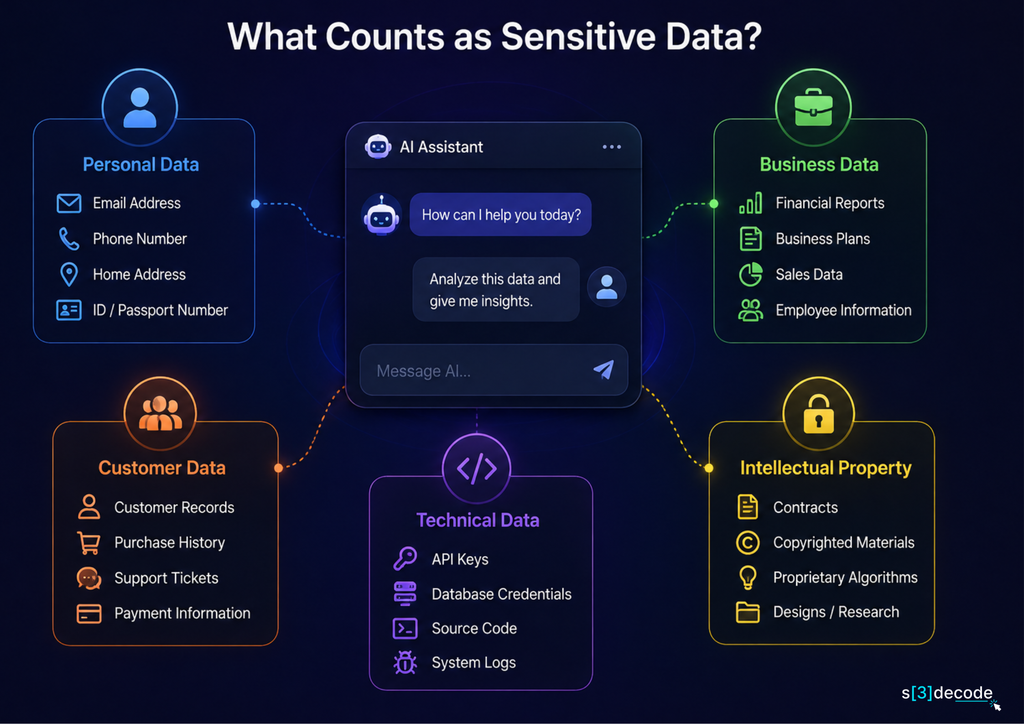
When people hear “sensitive data,” they often think about passwords, credit-card numbers, or Social Security numbers. Those are obvious examples, but they are only part of the picture.
Information can be sensitive because it is private, confidential, commercially valuable, or capable of causing harm if exposed. Something as simple as an internal product roadmap or an unreleased marketing campaign may not look like sensitive data, but sharing it with an unapproved AI tool can still create a serious business risk.
A useful rule is this: if you would not want the information posted publicly or sent to an unknown third party, don’t automatically put it into an AI tool.
1. Personal Information
Personal information includes data that identifies or can be linked to a specific person. This could include:
- Full names
- Home addresses
- Phone numbers and email addresses
- Government identification numbers
- Date of birth
- Account or customer IDs
- Location information
- Employment information
- Personal correspondence
Even individual pieces of information that seem harmless can become more sensitive when combined. For example, a name might not be particularly risky on its own, but a name combined with an address, account number, and purchase history creates a much more valuable dataset.
2. Business and Confidential Information
Businesses often have sensitive information that isn’t technically a “secret” but still shouldn’t be shared outside approved systems.
Examples include:
- Business plans and product roadmaps
- Internal financial information
- Pricing strategies
- Sales forecasts
- Acquisition or partnership discussions
- Internal reports
- Employee communications
- Customer contracts
- Unreleased products or features
- Competitive research
- Internal policies and procedures
For example, asking an AI tool to “summarize our upcoming acquisition plan” may seem harmless if you’re only looking for a shorter version. However, the underlying document could contain commercially sensitive information that shouldn’t leave the company’s approved environment.
3. Technical Information
Developers and IT teams need to be particularly careful because technical information can provide a direct path to systems or reveal how they work.
Sensitive technical data can include:
- API keys and access tokens
- Database credentials
- SSH keys
- Authentication cookies
- Environment variables
- Private repository code
- Internal IP addresses
- Database schemas
- Infrastructure configurations
- Security logs
- Vulnerability details
- Proprietary algorithms
Not all technical information gives an attacker immediate access. Even seemingly harmless architecture diagrams, configuration files, or database structures can reveal useful information about how an organization’s systems are built.
4. Customer and Employee Data
Customer and employee information deserves extra caution because it can combine personal, financial, employment, and operational data.
Consider a support employee who wants an AI tool to analyze customer complaints. Instead of uploading the complete support export, they may only need the complaint text with names, email addresses, order numbers, and other identifying details removed.
The same principle applies to employee records. Performance reviews, salary information, HR complaints, resumes, and internal communications may contain information that should only be processed within approved systems.
5. Intellectual Property
Sensitive information isn’t always personal information. Intellectual property can be just as valuable.
This includes:
- Source code
- Product designs
- Research data
- Proprietary formulas
- Engineering documents
- Unpublished articles or books
- Patent-related information
- Marketing campaigns that haven’t launched
- Original datasets
- Trade secrets
For example, a company developing a new software product might ask an AI coding assistant to improve a proprietary algorithm. The code itself could be commercially valuable even if it contains no passwords or personal information. That’s why “there are no secrets in this file” isn’t always a sufficient reason to upload it.
A Simple Test Before Sharing Data With AI
Before pasting text or uploading a file, ask yourself three questions:
1. Who owns this information?
Is it yours, your employer’s, a customer’s, or someone else’s?
2. Would there be a problem if someone outside the intended audience saw it?
If the answer is yes, treat it as sensitive.
3. Does the AI tool actually need the complete information?
If not, remove or replace unnecessary details before sending it.
The goal isn’t to treat every piece of information as equally dangerous. Instead, it is to recognize that data sensitivity depends on context.
A customer email address, an internal pricing spreadsheet, a private Git repository, and an API key have very different levels of risk. But all four deserve more care than ordinary public information.
Once you start classifying information this way, the next question becomes much more important: what actually happens to that data after you give it to an AI tool?
Why Is Putting Sensitive Data Into AI Tools Risky?
AI tools are designed to process the information you provide. That’s what makes them useful—but it also means you need to understand what happens to your data after you click Send.
The risk isn’t necessarily that an AI tool will immediately “leak” your information. The bigger issue is that your data may pass through systems, storage layers, integrations, or third-party services that you don’t fully control.
Here are some of the main reasons sensitive information requires extra caution.
1. Your Data May Be Stored
When you send a prompt or upload a document, the information may be stored for some period of time depending on the AI provider, account type, and settings.
That creates an important distinction between using AI to process data and sending data somewhere without understanding its retention.
For example, you might upload an internal report, get a summary, and delete the conversation afterward. That doesn’t necessarily mean every copy or associated record has immediately disappeared. Retention policies can vary, so it’s worth checking the provider’s documentation rather than assuming deletion means instant removal everywhere.
2. Data May Be Used for Model Improvement
Some AI services may use user interactions to improve their models or services, while others provide settings or business plans that offer different data-use protections.
This is why you shouldn’t assume that two AI tools handle your information in exactly the same way.
Before using an AI service with confidential information, check whether:
- Your prompts can be used to improve models
- You can disable data sharing or training
- Uploaded files are retained
- Conversations are stored
- Human reviewers may access submitted content
- Business or enterprise accounts have different data controls
A familiar brand name doesn’t remove the need to check these details.
3. Third-Party AI Tools Create Additional Risk
AI is increasingly built into products you already use. Your CRM, coding environment, browser extension, productivity software, customer-support platform, or document application may include an AI feature.
That can create another layer of risk.
Imagine an employee copies customer information into an AI-powered browser extension because it makes research faster. The company may have approved the browser but never approved the AI service behind the extension.
This is one reason shadow AI is becoming a concern for organizations. Employees may use AI services that haven’t gone through the company’s security, privacy, or compliance review. The more services involved in processing sensitive information, the more carefully those connections need to be evaluated.
4. AI Agents Have a Larger Attack Surface
Traditional chatbots generally wait for you to provide information and ask a question. AI agents can go much further.
Depending on how they’re configured, an agent may be able to access files, search internal systems, interact with applications, execute code, send messages, or perform actions on your behalf.
That changes the security question.
Instead of asking only:
“What data did I give the AI?”
you also need to ask:
“What data and systems can the AI access?”
An agent with access to an entire cloud drive presents a very different risk from a chatbot that can only process a small piece of text you manually provide.
The principle of least privilege therefore matters with AI just as it does with other software: give an AI system only the access it actually needs to perform its job.
5. AI Can Accidentally Reveal Information
There is another risk that is easy to overlook: information can sometimes appear in an AI-generated response when you didn’t expect it.
For example, an AI system connected to internal company information might generate a response that includes details from a document, database, or connected application that the user didn’t intend to expose.
The problem isn’t necessarily malicious behavior. It can come from poor permissions, overly broad context, misconfigured integrations, or simply asking an AI system to combine information that should have remained separate.
That’s particularly important when AI is connected to business systems.
6. The Biggest Risk Is Often the Human Workflow
In many cases, the first security problem isn’t the AI model itself. It’s the way people use it.
Someone is under a deadline and pastes an entire customer spreadsheet into a chatbot instead of removing unnecessary columns. A developer shares an .env file while asking an AI coding assistant to troubleshoot an error. An employee uploads a confidential presentation because they want help rewriting it.
These actions can happen in seconds.
The safer approach is to make data minimization part of the workflow. Give an AI tool the smallest amount of information necessary to complete the task, and remove anything it doesn’t need.
That single habit can significantly reduce the amount of sensitive information exposed to an AI system.
The next step is even more practical: which types of information should you never put into an AI tool in the first place?
What Information Should You Never Put Into an AI Tool?
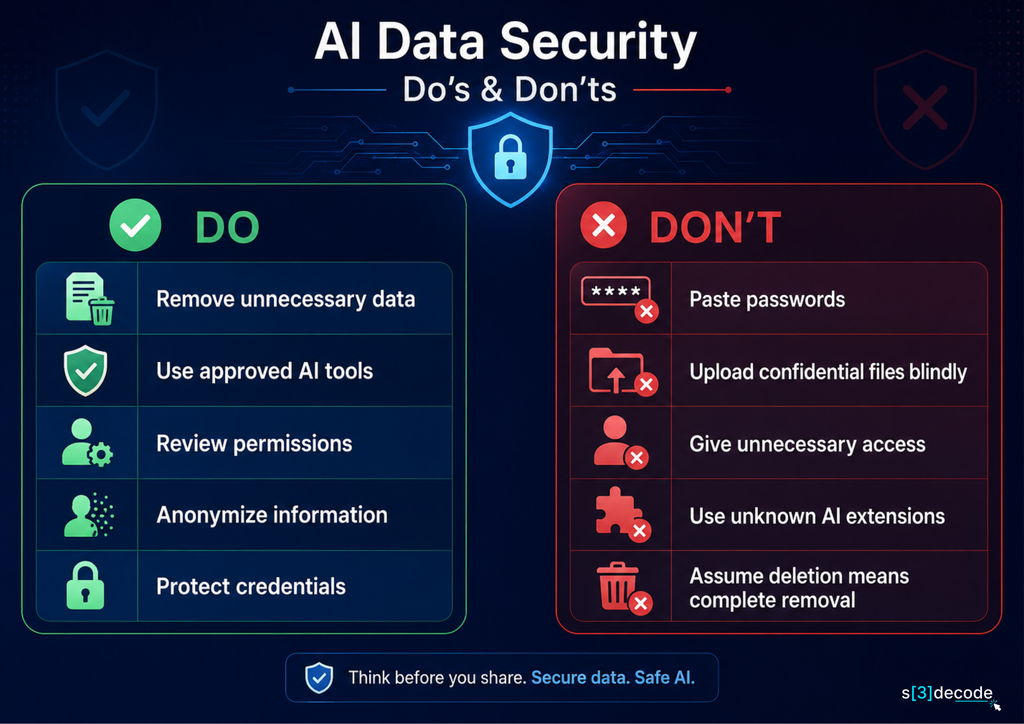
Not every piece of information needs to be treated like a top-secret document. But some data should simply never be pasted into an AI tool unless you are using an approved system with the right security controls.
A good starting point is to separate information that can cause immediate account or system compromise from information that creates privacy, legal, or business risks.
| Data Type | Examples | What to Do |
|---|---|---|
| Passwords | Account passwords, admin credentials, master passwords | Never share |
| API secrets | API keys, authentication tokens, service credentials | Never share |
| Financial data | Bank details, card numbers, financial account information | Avoid sharing |
| Customer data | Names, addresses, emails, private records, account details | Anonymize first |
| Source code | Proprietary applications, private repositories, internal algorithms | Use approved tools |
| Legal documents | Confidential contracts, litigation documents, privileged communications | Check policy first |
| Company strategy | M&A plans, financial forecasts, pricing strategies, product roadmaps | Keep private |
| Health information | Medical records, treatment information, patient data | Avoid unless appropriate safeguards exist |
| Private credentials | SSH keys, OAuth tokens, database credentials, session cookies | Never share |
1. Passwords and Login Credentials
This one should be straightforward: don’t paste your passwords into an AI chatbot.
It doesn’t matter whether you’re asking the AI to troubleshoot a login problem, evaluate password strength, or help configure an application. There is almost always a safer way to describe the problem without providing the actual credential.
Instead of sharing:
“My admin password is
...and I’m getting this error.”
Describe the authentication problem without revealing the password.
The same rule applies to administrator credentials, database passwords, cloud console logins, and other authentication information.
2. API Keys, Tokens, and Secrets
Developers frequently make this mistake when troubleshooting code.
An AI assistant may need to understand how an API call works, but it doesn’t need the actual secret that authenticates the request.
Never paste:
- API keys
- AWS access keys
- GitHub tokens
- Database passwords
- SSH private keys
- OAuth tokens
- Authentication cookies
.envfiles containing secrets- Service-account credentials
If a secret has already been exposed, don’t simply delete the conversation and assume the problem is solved. Revoke or rotate the credential first, then review relevant logs and access activity.
3. Financial Information
Bank account numbers, payment-card information, transaction details, tax information, and other financial records can contain highly sensitive information.
For example, if you want AI to analyze spending patterns, you may not need to provide the account holder’s name, account number, address, or other identifying information. Remove unnecessary details and use a sanitized dataset whenever possible.
4. Customer Information
Customer data is another area where convenience can quickly become a privacy problem.
Suppose a support team wants AI to categorize customer complaints. Uploading the entire customer database isn’t necessary if the AI only needs the text of the complaints.
Instead, remove information such as:
- Names
- Email addresses
- Phone numbers
- Customer IDs
- Addresses
- Payment information
- Other identifying details
The objective is simple: give the AI the information needed to complete the task, not everything available in the original record.
5. Proprietary Source Code
Source code can represent significant intellectual property, even when it doesn’t contain obvious secrets.
Before sending code to an AI coding assistant, consider whether it contains:
- Proprietary business logic
- Internal APIs
- Security mechanisms
- Database structures
- Unreleased features
- Private dependencies
- Credentials or environment variables
- Trade-secret algorithms
If your organization has approved an AI coding tool with appropriate privacy and security controls, using it may be acceptable under company policy. But uploading proprietary code to a random online AI tool simply because it offers free code analysis is a very different situation.
6. Confidential Legal Documents
Contracts, merger documents, legal correspondence, regulatory documents, and other confidential material should not automatically be uploaded for summarization or analysis. Legal information can carry confidentiality, privilege, contractual, or regulatory considerations that go beyond ordinary data privacy.
If you need AI assistance with a legal document, first determine whether the tool and account you’re using are approved for that type of information.
7. Company Strategy and Internal Plans
Some of the most valuable information inside a company isn’t technically a “secret.” A product roadmap, upcoming pricing change, acquisition discussion, sales forecast, unreleased marketing campaign, or internal strategy document could still provide competitors with valuable information.
For example, asking an AI tool to rewrite an unreleased product announcement may expose information about a product that hasn’t been publicly disclosed yet.
If the information could affect your competitive position, treat it as confidential even if it doesn’t contain passwords or personal data.
8. Health and Medical Information
Medical records and other health-related information can be particularly sensitive.
Examples include:
- Patient records
- Medical histories
- Test results
- Treatment information
- Insurance information
- Employee health records
If AI is being used in a healthcare or workplace setting, don’t assume a general-purpose chatbot is appropriate simply because it can process the information. The tool, account, contractual arrangements, security controls, and applicable requirements all matter.
9. Sensitive Doesn’t Always Mean Secret
One of the most important distinctions to understand is that sensitive data isn’t limited to information that can directly unlock an account.
A password is secret.
A confidential product roadmap may not be secret in the same technical sense, but it is still sensitive.
A customer complaint may not contain a password, yet it could contain personally identifiable information.
An internal source-code repository may contain no credentials at all, but the code itself may be valuable intellectual property.
That’s why the safest question isn’t simply:
“Does this contain a secret?”
Instead, ask:
“Would I be comfortable with this information being processed by a third-party system?”
If the answer is no, stop before you paste or upload it.
The good news is that you don’t have to avoid AI completely. In many cases, you can safely use it by removing unnecessary information first. The next section explains exactly how to protect sensitive data from AI tools before you send a prompt or upload a file.
How to Protect Sensitive Data From AI Tools
You don’t need to stop using AI to protect sensitive information. The safer approach is to build a few simple checks into your workflow.
Before you paste a prompt, upload a document, or connect an AI agent to a business system, take a moment to consider what data the tool needs, what it can access, and how that information is handled.
Here are the most important steps to follow.
1. Read the AI Tool’s Privacy and Data-Usage Settings
Don’t assume every AI tool handles your conversations and uploaded files in the same way.
Before using an AI service for anything sensitive, check its privacy and data-use settings. Look for information about:
- Whether conversations are stored
- How long data is retained
- Whether prompts or files can be used to improve models
- Whether you can disable data sharing or training
- How uploaded files are handled
- Whether humans may review conversations
- What controls are available for business accounts
- How you can delete your data
These details can differ between products, account types, and plans.
For example, a consumer AI account and an enterprise workspace from the same provider may offer very different administrative and data-governance controls.
Don’t rely on the tool’s reputation alone. Check the actual policy and settings before sharing confidential information.
2. Use Business or Enterprise AI Accounts for Business Data
If employees regularly use AI for work, organizations should avoid leaving data-security decisions entirely to individual employees.
Business and enterprise AI offerings may provide additional controls such as centralized administration, user management, access controls, audit capabilities, contractual protections, and organization-level privacy settings.
However, there’s an important distinction:
Paid doesn’t automatically mean secure.
An enterprise plan can provide stronger controls, but those controls still need to be configured correctly. Employees also need to understand which types of information they’re allowed to process.
A company should therefore have an approved list of AI tools and clearly define what data can be used with each one.
3. Remove Sensitive Information Before Sending a Prompt
One of the simplest ways to reduce AI data exposure is to send less information.
Suppose you want AI to analyze a customer complaint. You probably don’t need to provide the customer’s full name, phone number, email address, account number, and address.
Instead, replace unnecessary details with placeholders.
Before:
“John Smith, customer ID 847291, emailed from john.smith@example.com saying his order #55281 arrived damaged. Please draft a response.”
After:
“Customer [NAME], account [ID], reported that their order arrived damaged. Please draft a professional response.”
The AI can still perform the task, but you’ve reduced the amount of personal information being exposed.
This is known as data minimization: provide only what is necessary for the task.
4. Anonymize and Redact Data
Removing sensitive information before sending it to an AI tool is even more important when working with large datasets or documents.
Depending on the situation, you can:
- Remove names and contact details
- Replace customer IDs with random identifiers
- Remove account numbers
- Mask financial information
- Remove addresses and precise locations
- Replace company names with placeholders
- Delete unnecessary metadata
It’s also useful to understand the difference between redaction, anonymization, and pseudonymization.
Redaction removes specific information entirely.
Anonymization attempts to remove identifying information so individuals can no longer reasonably be identified.
Pseudonymization replaces identifying information with another identifier while the original identity may still be recoverable through additional information.
For example, instead of asking AI to analyze:
“Jane Doe purchased Product X for $2,400 on March 4.”
you might provide:
“Customer A purchased Product X for $2,400.”
If the person’s identity isn’t relevant to the analysis, there is no reason to expose it.
5. Never Paste Passwords, API Keys, or Access Tokens
This deserves its own rule because credentials can turn a privacy mistake into a security incident.
Never paste secrets into an AI tool simply because you’re trying to troubleshoot a problem.
That includes:
- API keys
- AWS credentials
- GitHub access tokens
- Database passwords
- SSH private keys
- OAuth tokens
- Session cookies
- Service-account credentials
.envfiles containing secrets
If an AI assistant needs to understand your configuration, replace the secret with a placeholder.
For example:
API_KEY=[REDACTED]
rather than providing the actual key.
If a real credential has already been shared, don’t just delete the conversation. Treat the credential as potentially exposed.
A practical response is:
Revoke → Rotate → Audit → Investigate
Revoke or invalidate the exposed credential, create a replacement, check relevant access logs, and investigate whether the credential was used.
6. Be Careful With AI Coding Tools
AI coding assistants deserve additional attention because developers often give them access to repositories, terminals, files, development environments, and other tools.
Before using an AI coding tool with proprietary code, check:
- Which files it can access
- Whether repository content is retained
- Whether code is used for model improvement
- Whether the tool can access environment variables
- Whether it can execute commands
- Whether it can modify files
- Whether it can access production systems
- Which extensions or integrations are enabled
The distinction between an AI coding assistant and an AI coding agent also matters.
An assistant might suggest code based on the context you provide. An agent can potentially inspect files, run commands, modify code, interact with tools, and take actions on your behalf.
The more capable the system, the more important permissions and access boundaries become.
7. Review AI Tool Permissions
When an AI tool asks for access to your files, email, cloud storage, code repositories, calendar, CRM, or other applications, don’t automatically click Allow.
Ask what the integration actually needs.
For example, if an AI tool only needs to summarize documents from one project folder, giving it access to an entire company drive may be unnecessary.
Follow the same principle used in traditional security:
Give AI the minimum access required to do its job.
Regularly review connected applications and remove permissions that are no longer needed.
8. Don’t Upload Sensitive Files Without Checking Where They Go
Files can contain considerably more information than what you see on the screen.
A spreadsheet may contain hidden columns. A presentation may contain speaker notes. A Word document can contain comments or tracked changes. An image may contain metadata. A PDF may contain information that isn’t immediately obvious from the visible page.
Before uploading a file to an AI service, ask:
- Does the AI actually need the entire file?
- Does it contain hidden or unnecessary information?
- Does it contain personal or confidential data?
- Where will the file be stored?
- How long will it be retained?
- Can the file be deleted afterward?
- Is the service approved for this type of information?
Sometimes the safest option is not to upload the original file at all. Extract the specific information needed for the task, remove unnecessary details, and send only that smaller dataset.
9. Keep Sensitive AI Work Inside Approved Tools
Organizations should make the secure option the easy option.
If employees need AI for writing, coding, research, analysis, or customer support, provide approved tools and clear rules for using them.
A simple policy could distinguish between:
Public data → Can generally be used with approved AI tools.
Internal data → Use only approved organizational tools.
Confidential data → Requires additional approval and appropriate security controls.
Highly sensitive data → Do not use with AI unless the organization has explicitly approved the workflow.
This reduces the temptation to use random AI websites, browser extensions, or free tools when employees need to complete a task quickly.
The goal isn’t to prevent people from using AI. It’s to make sure AI usage happens inside a controlled workflow rather than through accidental data sharing.
What to Do If You Accidentally Shared Sensitive Data With an AI Tool
Even with a good AI data-security policy, mistakes can happen. Someone may paste an API key into a chatbot, upload the wrong spreadsheet, or share a customer record without realizing it contains personal information.
The important thing is not to panic or simply delete the conversation and move on. The right response depends on what was shared, which AI service received it, and what access or exposure may have resulted.
Treat the situation like any other potential data-security incident.
1. If You Shared a Password, API Key, or Access Token
Credentials should be treated as compromised once they have been entered into an AI service that wasn’t approved to receive them.
Don’t rely on deleting the prompt as your primary response.
Instead, immediately:
- Revoke the credential if the service allows it.
- Generate a new credential with appropriate permissions.
- Check access logs for unusual activity.
- Review systems connected to the credential.
- Notify your security team if the credential belonged to your organization.
- Document what happened and when.
For example, if an AWS access key was accidentally pasted into an AI chatbot, simply removing the conversation isn’t enough. The safer approach is to disable the exposed key, issue a replacement, and investigate whether the original credential was used.
The same principle applies to GitHub tokens, database credentials, SSH keys, OAuth tokens, and other secrets.
2. If You Shared Customer or Personal Data
Personal information requires a different response.
First, determine exactly what was shared. There’s a significant difference between accidentally entering a customer’s name and sending a complete database containing names, addresses, financial information, or other sensitive records.
Record details such as:
- What information was shared
- How many people were affected
- Which AI service received it
- Which account or workspace was used
- When the information was submitted
- Whether the data was uploaded as a file or entered as text
- What retention and deletion controls apply
If the information belongs to customers, employees, patients, or other individuals, involve the appropriate privacy, legal, and security teams.
Depending on the type of information, location, and applicable regulations or contracts, the incident may create notification or reporting obligations.
3. If You Shared Confidential Company Information
Perhaps you uploaded an unreleased product roadmap, internal financial report, acquisition documents, proprietary research, or confidential source code.
The first step is to understand exactly what was exposed.
Identify the AI provider, account type, conversation, uploaded files, and relevant data-handling settings. Check whether the organization has contractual or administrative controls that apply to the account.
Your security or privacy team should then assess:
- Whether the information was highly confidential
- Whether the AI service was approved
- Whether the information may have been retained
- Whether other users could access it
- Whether the information was subject to contractual restrictions
- Whether additional systems or people could have been affected
For particularly sensitive information, the incident should be handled through the organization’s normal security and incident-response process.
4. Don’t Assume Deleting the Chat Solves the Problem
Deleting a conversation can be useful, but it shouldn’t automatically be treated as complete remediation.
Different services may have different retention, backup, logging, and deletion practices. Business accounts may also have administrative retention policies that differ from consumer accounts.
That’s why the response should focus first on containing the potential exposure and understanding how the specific AI service handles the information.
5. Report Mistakes Quickly
Employees sometimes hesitate to report accidental data sharing because they are worried about getting into trouble.
That can make a small incident much worse.
A company should create an environment where employees can quickly report mistakes without unnecessary fear or blame. Early reporting gives security teams more time to revoke credentials, investigate access, determine the scope of exposure, and take appropriate action.
A useful internal message could be as simple as:
“I accidentally submitted confidential information to an AI tool. Here’s what I shared, which service I used, and when it happened.”
That gives the security team enough information to begin investigating.
6. Learn From the Incident
An accidental disclosure shouldn’t only result in an employee being reminded to “be more careful.”
Look at why the mistake happened.
Was the approved AI tool difficult to use? Was the data-classification policy unclear? Did the employee have access to more information than necessary? Was there no warning before sensitive data was submitted? Could DLP or another security control have prevented it?
The answers can help organizations improve their AI security practices.
The goal of incident response isn’t simply to deal with one mistake. It’s to reduce the likelihood and impact of the next one.
Conclusion
AI can make everyday work faster, but convenience should never come at the cost of losing control over sensitive information.
The biggest mistake is treating every AI tool as if it handles data in the same way. Different providers, account types, integrations, and AI agents can have very different privacy, retention, and permission models. What matters is understanding those differences before sharing information.
For individuals, the safest approach is straightforward: share less, remove sensitive details, never expose credentials, review permissions, and use trusted tools for confidential work.
For businesses, the responsibility goes further. Clear AI usage policies, data classification, employee training, access controls, approved AI platforms, and monitoring can help reduce accidental data exposure without preventing employees from benefiting from AI.
You don’t need to stop using AI to protect sensitive data. You need to become more deliberate about what AI receives, what it can access, and what it is allowed to do.
As AI assistants and agents become more deeply connected to business systems, that distinction will become even more important. The organizations that get the most value from AI won’t simply be the ones using the most powerful tools—they’ll be the ones that know where to draw the line between useful access and unnecessary exposure.