![s[3]decode](https://s3decode.com/wp-content/uploads/2026/05/logo-s3decode.png)
Creating a professional photo traditionally required a photographer, location, lighting, equipment, models, props, and post-production. Even a relatively simple product shoot could take days to plan and produce. Text-to-photo AI generators changes that workflow.
Instead of organizing a photoshoot, you can describe the scene you want and have an AI model generate it. You can ask for a product on a studio table, a founder working in a modern office, a realistic food photograph, or an advertising scene that would be difficult to photograph traditionally.
But the technology has moved beyond simply typing a prompt and clicking Generate.
Modern tools can now work from text, reference images, sketches, existing photographs, and brand assets. Some allow you to edit individual parts of a generated image, maintain a character across multiple scenes, generate images through an API, or move directly from a still image into video.
That makes choosing the right platform more complicated.
A blogger may only need an easy image generator. An ecommerce brand may need accurate product visuals. A creative agency may prioritize consistency and commercial licensing. A developer may care about API pricing more than the user interface.
This guide looks at the best text-to-photo AI tools in 2026 with a focus on what each platform does, how it works, where it is most useful, pricing, strengths, limitations, and what type of user should consider it.
What Is a Text-to-Photo AI Tool?
A text-to-photo AI tool converts a written description into a photographic or photo-realistic image. For example, you could write a prompt:
“A premium wireless headphone photographed in a minimalist concrete studio, soft natural light from the left, subtle shadows, realistic reflections, shallow depth of field, commercial product photography.”
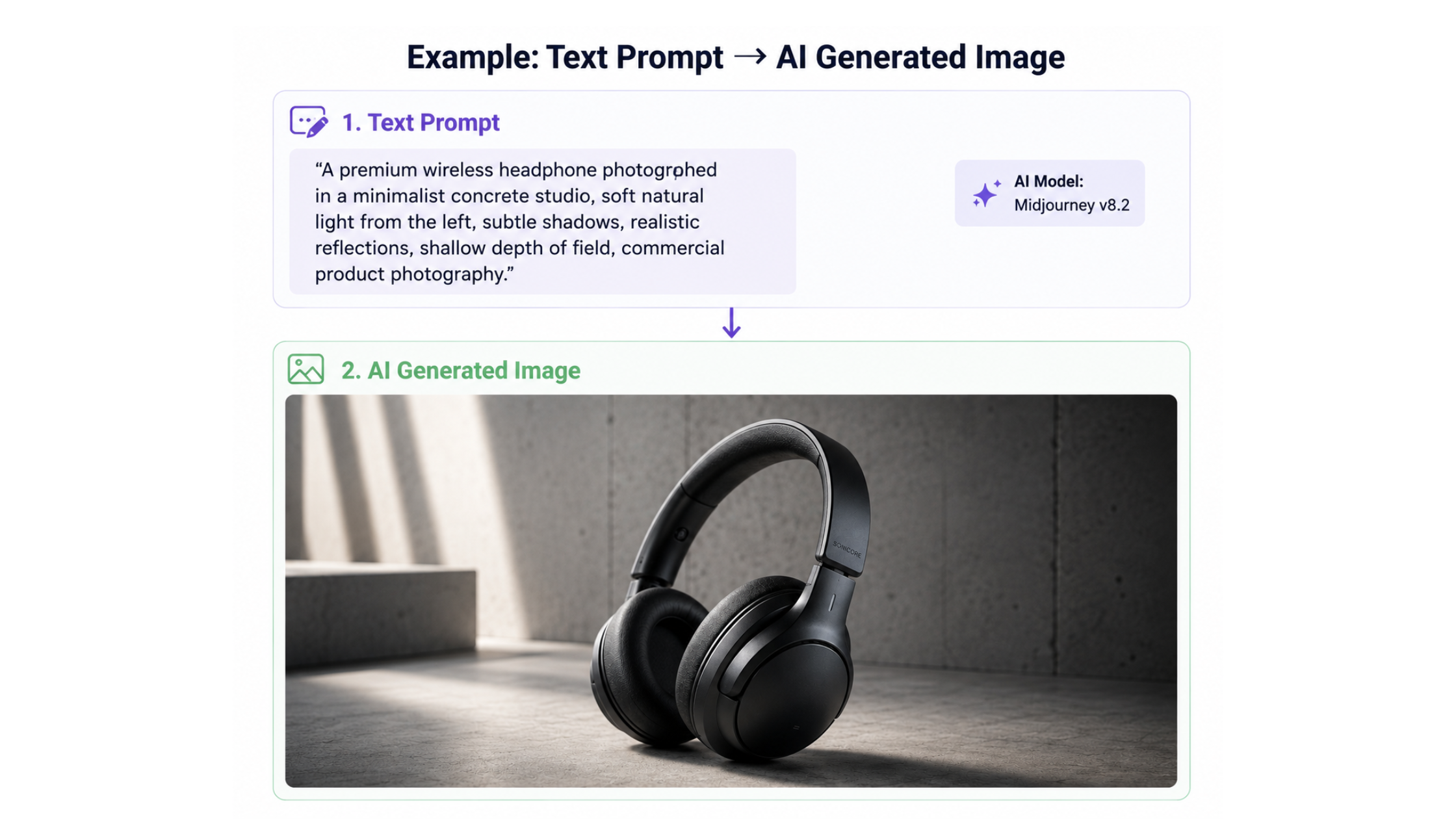
As you see in the image above, the AI interprets the prompt and generates the scene.
Behind the scenes, modern image models have learned relationships between language and visual concepts. They don’t simply search a database for an existing photograph matching your sentence. They generate a new visual representation based on the relationships they have learned during model training.
That is why you can combine details that may never have appeared together in a real photograph. You can request a product, location, lighting setup, camera perspective, mood, materials, and composition in one instruction. The more precise the visual requirements, the more useful your prompt tends to be.
Text-to-Image vs Text-to-Photo
These terms are closely related, but they aren’t exactly the same.
- Text-to-image is the broader category. It includes illustrations, concept art, posters, logos, diagrams, 3D-style visuals, and photographs.
- Text-to-photo usually refers to generating an image intended to look like a real photograph.
That distinction becomes important when choosing an AI tool. A platform might be excellent for fantasy artwork but less suitable when you need:
- A realistic product photograph
- A believable corporate headshot
- An editorial-style portrait
- A food photograph
- A realistic advertising scene
For this article, the focus is primarily on tools that can create photorealistic or commercially useful visuals, although many also support illustration and design.
1. ChatGPT Images – Best for Conversational Generation and Editing
ChatGPT Images is particularly useful when you want the image-generation process to feel like a conversation rather than a technical design interface. You describe what you want, the system generates an image, and you can then ask for changes without rebuilding the prompt from scratch.
For example:
“Create a realistic photograph of a startup founder working in a bright modern office.”
After seeing the result, you could say:
“Make the office darker and more premium.”
Then:
“Move the subject closer to the right side.”
And finally:
“Make it a 16:9 image suitable for a blog header.”
Let’s understand it visually:
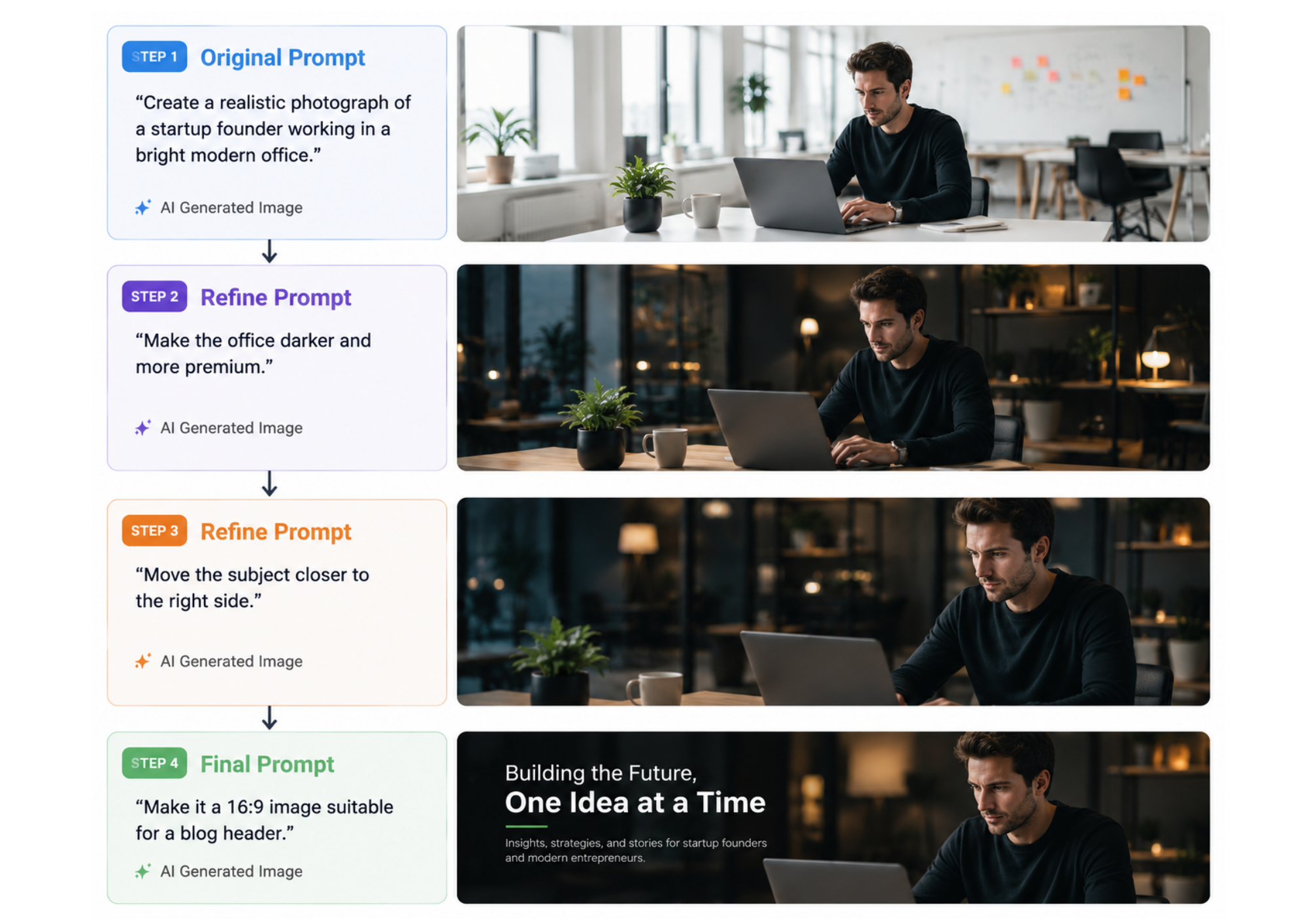
As you in image above, that iterative workflow is one of its biggest advantages.
OpenAI’s current ChatGPT Images documentation says users can create new images, upload existing images for editing, select specific areas for changes, add text and details, create transparent backgrounds, and choose different aspect ratios. ChatGPT Images 2.0 is available across ChatGPT tiers.
How it works
The biggest advantage of conversational AI image generation is that you don’t have to treat the first image as the final result. Instead, you can build the image gradually by describing what you want, reviewing the output, and then telling the AI what should change.
A typical workflow looks like this:
1. Describe the image you want
Start by explaining the scene in natural language. You can mention the subject, setting, lighting, mood, composition, colors, photography style, and image dimensions. You don’t need to know technical photography terms to get started. The AI can interpret everyday language and translate it into visual instructions.
2. Generate the first version
The AI analyzes your description and creates an image based on the details in the prompt. The first result should be treated as a starting point, not necessarily the finished image. Some elements may already look right while others may need adjustment.
3. Inspect the result
This is an important part of the process.
Look at the generated image and identify exactly what you want to improve. Instead of generating an entirely new image, you can often keep the parts that already work and change only the problem areas. The AI can use the previous image as context and modify the scene instead of starting from zero.
4. Request specific changes
This is where conversational image tools become particularly useful. You don’t necessarily need to manually select an object or understand image-editing techniques. The AI interprets your instruction and attempts to make the requested modification.
5. Refine the composition
You can continue making smaller adjustments until the image matches the purpose you have in mind.
6. Prepare the final version
Once the visual looks right, you can request final changes such as the correct aspect ratio, background, resolution, or layout. Some tools can also remove backgrounds, expand the canvas, upscale the image, or create transparent versions.
7. Export and use the image
After the final version is approved, you can export it and use it in your intended channel.
The key difference from traditional image editing is that you can communicate many of these changes in plain language rather than manually performing every adjustment yourself.
Strengths
- Very easy to use
- Strong natural-language editing
- Supports uploaded reference images
- Useful for both generation and modification
Limitations
It is a general-purpose creative tool rather than a specialist production platform built around one narrow photography workflow.
2. Midjourney – For People Who Care About the Final Look
Midjourney has become one of the best-known AI image platforms because of its strong emphasis on visual quality and creative aesthetics. It is particularly good when you’re not simply asking for a realistic photograph, but a photograph with a specific visual identity.
For example:
“Luxury perfume photographed on black marble, dramatic side lighting, soft golden reflections, dark premium background, high-end fragrance campaign.”
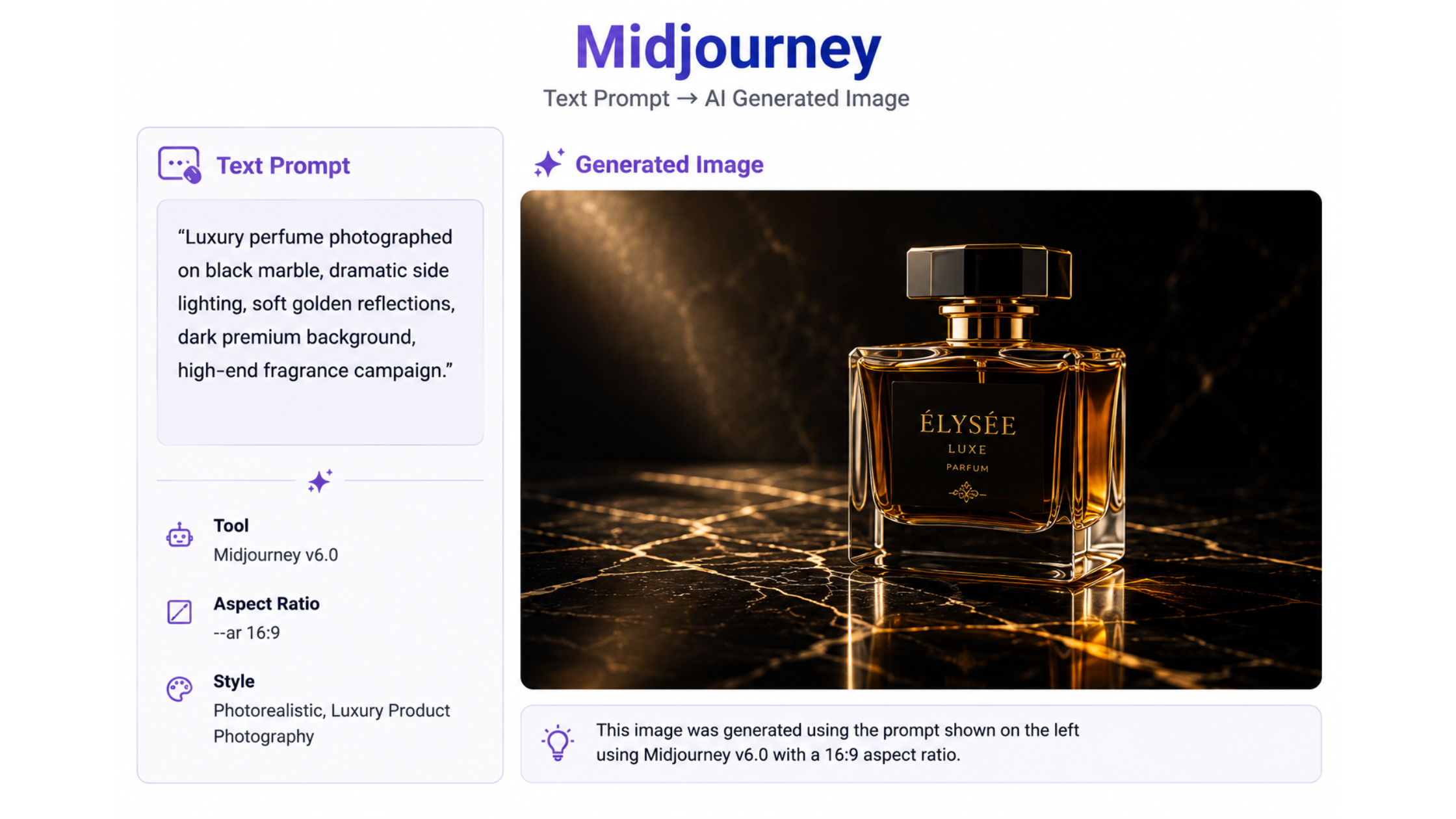
The model attempts to interpret the entire scene rather than simply placing the described object into a generic background.
Midjourney’s current default model is V8.2, released in July 2026. Midjourney describes V8.2 as an update focused on aesthetics, image quality, and personalization.
How it works
You typically start with a text prompt and can then use Midjourney’s generation and personalization features to explore different visual interpretations. The important part is iteration.
Your first generation gives you a direction. You can then explore variations, refine the prompt, and use the visual result as a guide for the next generation.
Pricing
Midjourney currently has four plans:
| Plan | Monthly Price |
|---|---|
| Basic | $10 |
| Standard | $30 |
| Pro | $60 |
| Mega | $120 |
Annual subscriptions receive a 20% discount. Standard, Pro and Mega plans provide unlimited image generations in Relax Mode, while private Stealth Mode is available on Pro and Mega.
Strengths
- Strong visual aesthetics
- Excellent creative exploration
- Good for advertising and editorial imagery
Limitations
For highly structured enterprise workflows, other platforms may provide stronger business integrations, editing systems, or developer APIs.
Commercial users should also check Midjourney’s current terms because commercial-use requirements vary according to company size and subscription.
3. Adobe Firefly – Best for Commercial Creative Workflows
Adobe Firefly is designed less like a standalone image generator and more like an AI creative workspace.
You can enter a text description to create an image, but the workflow doesn’t have to stop there. You can regenerate variations, modify individual elements, expand the image beyond its original boundaries, remove objects, change backgrounds, and continue editing the result in Adobe’s broader ecosystem.
How Firefly works
A typical workflow looks like:
→ Write a prompt
→ Generate variations
→ Select an image
→ Edit specific elements
→ Expand or resize
→ Finish the design
For example, a clothing brand could start writing a prompt with:
“Luxury fashion photograph of a woman wearing a black evening dress in a modern Parisian interior, soft window lighting, editorial photography.”
After generating the image, the designer could change the background, replace an object, expand the canvas for a website banner, or continue editing the image in Photoshop. This makes Firefly particularly useful when the generated image is one component of a larger marketing asset, rather than the final output by itself.
Adobe also provides access to partner models within Firefly, making it possible to compare different generation approaches within the same creative environment. Adobe highlights commercially oriented Firefly models and its use of licensed/public-domain training sources for those models.
What makes Firefly useful for businesses?
The biggest advantage is workflow integration. A marketing team may already work in Photoshop, Illustrator, or Adobe Express. Instead of generating an image in one application, downloading it, and moving it into another, Firefly can become part of the same production pipeline.
Strengths
- Strong image editing and generative fill capabilities
- Useful for commercial design workflows
- Works well with other Adobe products
- Suitable for creating multiple campaign variations
Limitations
- Its biggest advantage is integration, so it may be less compelling if you don’t use Adobe’s ecosystem.
- Credit-based plans can make high-volume usage harder to compare directly with flat-rate tools.
4. Google Imagen 4 – Best for Photorealistic Detail
Google’s Imagen models are designed to turn detailed descriptions into realistic images while preserving the visual relationships described in the prompt.
Imagen 4 is particularly notable for improvements in photorealism, detail, color, style, and text rendering. Google says the model can generate images at up to 2K resolution, while its faster mode can generate ideas up to 10 times faster than the previous generation.
How Imagen 4 works
The simplest workflow is:
Describe the scene → Specify visual details → Generate → Compare variations → Refine
For example:
“Realistic commercial photograph of a premium smartwatch on a brushed metal surface, soft studio lighting, subtle reflections, dark gray background, shallow depth of field.”
The model doesn’t simply look for those words independently. It attempts to create a single image where the product, lighting, environment, and composition work together. That becomes particularly useful for scenes with multiple elements. You can also include text-related requirements, which is important for product packaging, signs, posters, and marketing graphics.
Where Imagen 4 stands out
Google specifically highlights realistic images of people, animals, plants, landscapes and other subjects, along with stronger text generation and fine detail. For marketers, this can be useful when the image needs to look more like professional photography than digital artwork.
Strengths
- Strong photorealism
- High-detail output
- Up to 2K resolution
- Improved text rendering
- Useful for complex scenes
Limitations
- Access and pricing vary depending on whether you use Imagen through consumer Google products or developer services.
- If your primary requirement is advanced editing rather than generation, another platform may offer a better workflow.
5. Ideogram 4 – Best When Text Is Part of the Image
Ideogram is especially useful when you need words to appear correctly inside the generated image. That sounds like a small feature, but it solves one of the most common problems with AI-generated visuals. For example, a prompt such as:
“Luxury coffee shop photographed at night with a glowing sign that says ‘MONDAY COFFEE’.”
requires the model to generate both the scene and the exact typography.
How Ideogram works
You describe the image normally and include the text you want to appear. The model then attempts to generate the complete composition rather than asking you to add the headline afterward.
This makes it useful for:
- Posters
- Advertisements
- Product packaging
- Social media graphics
- Billboards
- Signs
- Promotional campaigns
Ideogram 4 is also available through an API, which makes it useful for businesses that want to generate visual assets programmatically. Its current API prices are $0.03 per image for Turbo, $0.06 for Default, and $0.10 for Quality.
Another useful feature: editing
Ideogram’s API supports not only generation but also Remix, Edit, Reframe, and Replace Background, allowing businesses to continue working with the generated image rather than starting from zero every time.
Strengths
- Strong typography
- Excellent for advertising graphics
- API support
- Useful editing and remixing tools
- Good for marketing-focused imagery
Limitations
- If your image contains no text, another model may be more suitable depending on the photography style.
- Highly polished product photography may require more experimentation.
6. Recraft – Best for Brand Visuals and Design Assets
Recraft is particularly useful when an image needs to become more than just a photograph. A business might need a product image today and then turn that visual language into:
A website graphic → packaging → social media creative → vector illustration → advertisement
Recraft is designed to support that broader creative workflow.
How Recraft works
You can begin with a text prompt or reference image, generate the visual, and then continue editing it. Instead of treating every generation as a separate asset, you can build a visual system around the image. This is particularly useful for brands because consistency is often more important than creating a single impressive picture.
Recraft’s current V4.1 models support both raster and vector workflows, while its API provides different pricing depending on the model. The company’s current V4.1 API pricing is approximately $0.035 per standard image and $0.21 for V4.1 Pro.
What makes Recraft different?
It combines image generation and design functionality. A designer can therefore move from an AI-generated concept toward something much closer to a finished marketing asset.
Recraft distinguishes between free and paid usage. Its documentation states that free-plan images are public and not commercially licensed, while paid plans provide ownership and commercial-use rights under the applicable terms.
Strengths
- Strong branding capabilities
- Raster and vector generation
- Useful editing workflow
- Good for marketing assets
- API support
Limitations
- More features can mean a steeper learning curve.
- May be unnecessary if you only need occasional blog images.
7. FLUX 3 – Best for Next-Generation Image Generation and Creative Workflows
FLUX 3 is the latest generation from Black Forest Labs and represents a bigger change than a simple upgrade from FLUX.2. Instead of focusing only on image generation, FLUX 3 is designed as a multimodal model that understands and generates images, video, and audio within a unified architecture. Black Forest Labs says the model is designed to better understand real-world objects, relationships, movement, and context.
How FLUX 3 works
For image creation, you can describe the scene you want in natural language and use the model to generate or edit the image. Black Forest Labs says FLUX 3 has improved its ability to handle complex prompts, multiple styles, aspect ratios, resolutions, and accurate text rendering compared with earlier FLUX generations.
The broader workflow can look like:
Text prompt → Generate image → Edit or refine → Use as a visual reference → Move into video
That last step is where FLUX 3 becomes particularly interesting.
Because the model is multimodal, the same technology is being expanded beyond static images into video and audio. FLUX 3 Video is already generally available through the BFL API and selected partners, supporting text-to-video and image-to-video generation with clips of up to 20 seconds and native audio generation.
What makes FLUX 3 different from FLUX.2?
FLUX.2 was primarily an image-generation family, while FLUX 3 is being positioned as a broader multimodal foundation model.
Black Forest Labs says FLUX 3 can handle image generation and editing while also providing the foundation for video, audio, and action-prediction capabilities.
That makes FLUX 3 more interesting for businesses that expect their AI creative workflow to eventually include more than static images.
Why it is useful for text-to-photo generation
For this article specifically, the most relevant improvements are:
- Complex prompts: Better suited to scenes containing multiple objects and detailed instructions.
- Text rendering: Black Forest Labs highlights improved text accuracy across multiple languages.
- Image editing: The FLUX 3 family is designed to support image synthesis and editing.
- Multiple visual styles: It isn’t limited to one cinematic or photographic aesthetic.
- Multimodal workflow: Generated images can become part of broader image, video, and audio workflows.
Advantages
- Next-generation FLUX architecture
- Strong focus on real-world visual understanding
- Improved complex-prompt handling
- Better text rendering
- Image generation and editing
- Expanding into video and audio
Limitations
- Some FLUX 3 capabilities are still being rolled out rather than being equally mature across every modality.
- Developers need to check the exact model and API availability they intend to use.
- Pricing and access differ depending on the FLUX 3 capability and deployment method.
8. Leonardo AI – Best for Controlled Creative Production
Leonardo AI is designed for people who want more control over the creative process than a simple prompt-and-generate workflow provides. It can be used to create photographs, characters, illustrations, concept art, product visuals, and other assets.
How it works
A basic Leonardo workflow is:
Prompt → Generate multiple results → Choose a direction → Refine → Create variations
The advantage becomes more noticeable when you’re creating a set of related assets.
For example, a fashion brand may need the same product shown in different environments. A game studio may need the same character in different poses. A marketing campaign may need several scenes with a consistent visual identity. Reference images and creative controls can help maintain that relationship.
Where Leonardo fits
Leonardo is particularly useful when image generation is part of an ongoing creative project instead of a one-off task. You might use it for:
- Character development
- Product concepts
- Social media campaigns
- Game assets
- Marketing imagery
- Creative concepts
Strengths
- Broad creative toolkit
- Useful for consistent asset creation
- Good balance between realism and creative styles
- Suitable for marketing and concept development
Limitations
- More controls can make it less beginner-friendly.
- Users generating occasional simple images may not need its broader feature set.
9. Krea – Best for Rapid Visual Experimentation
Krea is useful when your main challenge isn’t generating one image but exploring many visual directions quickly. This is particularly valuable during the concept stage of a project.
Imagine an art director is working on a campaign and wants to compare:
- Luxury studio photography
- Outdoor lifestyle photography
- Futuristic product design
- Minimal editorial imagery
Instead of spending hours developing each concept separately, Krea makes rapid visual exploration part of the workflow.
How it works
You provide a prompt or reference, generate an image, adjust the direction, and immediately experiment again. Krea also combines image generation with other capabilities such as image upscaling, video models, 3D tools, and LoRA training.
Its current Free tier provides 100 compute units per day. The Basic plan is $9/month with 5,000 compute units, while Pro is $35/month with 20,000 units and workflow automation features.
Strengths
- Fast experimentation
- Useful for art direction
- Image, video and 3D capabilities
- LoRA training on higher plans
Limitations
- Heavy usage can consume compute units quickly.
- Users looking only for simple image generation may find the wider toolset unnecessary.
10. Freepik AI – Best for High-Volume Marketing Content
Freepik AI is designed around a broader content-production workflow. That’s important because marketing teams rarely need one image. They might need dozens of, blog images, social graphics, advertisements, thumbnails, product variations and presentation visuals.
Freepik’s advantage is therefore not necessarily that every individual image will outperform every specialist image model. Its advantage is the ability to generate, modify, adapt, and prepare content within a broader creative ecosystem.
How it works
A typical workflow is:
Generate → Edit → Upscale → Resize → Adapt → Publish
You can generate a visual for a blog post and then adapt that creative for another platform without rebuilding everything from scratch. The platform also provides AI tools beyond simple text-to-image generation, making it particularly relevant to content teams.
Strengths
- Designed around content production
- Useful for high-volume workflows
- Multiple AI creative features
- Good option for marketing teams
Limitations
- Specialist creators may prefer more advanced image controls elsewhere.
- Credit usage needs to be monitored for high-volume generation.
11. DeepAI – Best for Simple and Affordable AI Image Generation
DeepAI takes a much simpler approach. You write what you want, click generate, and receive an image. Its current documentation recommends keeping prompts specific and simple, and the platform also supports editing by describing what should change.
How it works
You can start with a prompt such as:
“A realistic photograph of a coffee shop on a rainy evening, warm interior lighting, cinematic photography.”
After the image is generated, you can request changes rather than starting completely over. That makes DeepAI useful for people who don’t want to learn advanced generation controls.
What makes it attractive?
Its pricing is considerably simpler than many professional creative platforms. DeepAI Pro currently costs $9.99/month or $89.99/year and includes 500 standard image-generator calls per month, 60 Genius Mode images, and 10 Super Genius 2K images. Additional use comes from a prepaid wallet. It also provides access to more than 100 generative tools across image, video, music, chat, and other categories.
Strengths
- Low-cost entry
- Very easy workflow
- Multiple AI tools under one subscription
- API support
Limitations
- Less advanced creative control
- Professional photographers may prefer more specialized platforms
- Image quality varies depending on generation mode
12. Manus – Best When Image Generation Is Part of a Bigger Task
Manus is different from the other tools because its primary identity is AI agents, not image generation. That means it becomes interesting when you want AI to manage several connected steps. “Create a visual campaign for a new project management app.”
Manus currently provides Free, Pro and Team plans. Its free plan gives access to Chat Mode and Manus 1.6 Lite in Agent Mode, while Pro users receive access to Manus 1.6, 1.6 Max and Lite.
How it works
Instead of treating image generation as an isolated command, Manus can treat it as one step in a larger objective. This makes it more useful for founders, marketers and researchers who want to automate creative work around the image, not just image creation itself.
Strengths
- Agent-based workflow
- Can combine research and content generation
- Useful for larger multi-step projects
- Broader than an image generator
Limitations
- Not necessarily the best choice for pure image quality
- More complicated than a dedicated image generator
- Agent usage can consume credits depending on the task
13. Dreamina – Best for Image Generation Plus Easy Editing
Dreamina is part of the CapCut ecosystem and focuses heavily on accessible image creation and modification. It supports text-to-image generation, image-to-image workflows, reference images, background changes, expansion, upscaling and other editing tasks.
How it works
A typical workflow can be:
Prompt or reference image → Generate → Select a variation → Edit → Upscale → Export
This is particularly useful when the initial image is close but needs adjustments. For example:
“Create a realistic product photo of a smartwatch on a marble table.”
Then you could change the environment, expand the canvas, replace the background, or create additional variations.
Why creators may like Dreamina
The platform is particularly suitable for social media because it makes it relatively easy to move from a basic concept into several visual variations. That can be useful for:
- Blog imagery
- Posters
- Ads
- Product concepts
- YouTube thumbnails
Strengths
- Easy interface
- Generation and editing together
- Useful reference-image workflow
- Good for social and marketing content
Limitations
- Credit-based generation can become expensive with heavy use.
- Advanced users may prefer a more specialized professional workflow.
14. Dream by WOMBO – Best for Simple, Style-Based Creation
Dream by WOMBO takes one of the easiest approaches to AI image generation. Instead of exposing a large collection of technical controls, it focuses on, prompt and style and then generated artwork.
Its current platform offers more than 100 styles, allowing users to guide the overall visual direction without needing to understand detailed model parameters.
How it works
You provide a description such as: “A futuristic city at night with neon signs and flying cars.” Then choose a style that changes how the image is interpreted. This makes Dream useful for people who are more interested in creative experimentation than strict photorealism.
Strengths
- Very easy to learn
- Large range of styles
- Suitable for casual image generation
- Accessible to beginners
Limitations
- Not the strongest choice for exact product photography
- Less control than professional creative platforms
15. Artlist AI – Best for Complete Creative Production
Artlist AI becomes particularly useful when your final project needs more than a photo. Its AI Suite brings together image, video and voice generation, with credits shared across different creative tools and models. Artlist says its AI Suite plans include a Pro license for commercial and client work, including advertising, social media, TV, streaming and broadcast projects.
How it works
A campaign could move through:
Prompt → Image → Video → Voiceover → Music → Final content
That makes Artlist particularly interesting for agencies and video-production teams.
Its current image-generation system provides access to multiple models, and the credit cost depends on the model and settings. For example, current image prices range from 10 credits for Z-image Turbo 1K to 600 credits for GPT Image 1.5 High.
What makes Artlist AI Useful?
You aren’t locked into one image-generation model. A creator can choose different models depending on whether the priority is speed, realism, text, resolution or cost.
Artlist’s plan structure also ranges from smaller creator plans to very large professional allocations. Its documentation lists plans from 7,500 credits per month through 1.5 million credits, depending on the tier.
Strengths
- Images, video, voice and music together
- Commercial licensing
- Multiple models
- Good for professional campaigns
- High-volume plans available
Limitations
- Shared credit system can be complicated
- Overkill if you only need occasional images
- Heavy use requires close credit management
16. Higgsfield AI – Best for Consistent Image and Video Campaigns
Higgsfield is particularly interesting for professional visual campaigns because it combines image generation, image editing, consistency, and video generation.
Its current image platform provides access to more than 15 image models, including models from different providers as well as Higgsfield’s own systems. (higgsfield.ai)
How it works
The workflow can look like:
Text/reference → Generate → Edit → Preserve identity → Create variations → Animate
That last step is important. A campaign may start with a still image, but the same character or product might eventually need to appear in multiple videos. Higgsfield’s Soul ID system is designed to help maintain the identity of a person or character across different generations.
Higgsfield also positions its tools around ecommerce and product advertising, allowing businesses to transform product images into styled photography and video concepts.
Image-to-video
One of the platform’s biggest advantages is that the still image does not need to be the final output. You can move from a generated image into video using different video-generation models in the same ecosystem.
Strengths
- Strong character consistency
- Multiple image models
- Advanced image editing
- Image-to-video workflow
- Useful for advertising and ecommerce
Limitations
- Credit usage can become significant for heavy production
- More advanced than necessary for simple blog illustrations
- Multiple models can make the platform more complex for beginners
Which Text-to-Photo AI Tool Should You Choose?
Once you understand how these platforms work, the decision becomes much easier.
| Your Requirement | Strong Starting Options |
|---|---|
| Simple blog images | ChatGPT Images, DeepAI, Dreamina |
| Premium advertising photography | Midjourney, FLUX.3, Higgsfield |
| Adobe-based design workflow | Firefly |
| Realistic scenes and detailed images | Imagen 4 |
| Images with readable text | Ideogram 4 |
| Brand and design assets | Recraft, Firefly |
| API-based generation | FLUX.3, Ideogram, Recraft |
| Character consistency | Leonardo AI, Higgsfield |
| Fast visual experimentation | Krea, Dreamina |
| High-volume marketing | Freepik AI, Artlist AI |
| Beginner-friendly generation | DeepAI, Dream |
| Multi-step creative automation | Manus |
| Image + video campaigns | Artlist AI, Higgsfield |
What Should Businesses Consider Before Choosing One?
Image quality is only one part of the decision.
1. Does it produce the type of image you actually need?
A tool that excels at portraits may not be the best choice for product photography. A model that creates beautiful cinematic scenes may not accurately reproduce product packaging. Test it with your real prompts, not generic examples.
2. How much control do you need?
Some people want generic photo like “Make me an image of jewelry”
but some other want:
“Make me an image of gold like jewelry, change the background, move the object 10% to the left, keep the lighting unchanged, and create three aspect ratios.”
The second workflow requires much more advanced editing and reference support.
3. Do you need consistency?
This is one of the most important considerations for commercial campaigns. Generating one realistic image is relatively easy but generating 20 images that look like they belong to the same campaign is much harder. Look for reference-image controls, character consistency, style controls, and editing workflows.
4. How much will it actually cost?
Don’t compare only subscription prices. Consider subscription, credits, failed generations, editing, API usage or upscaling etc. A $10/month tool may become more expensive than a $30 tool if you need hundreds of attempts to get usable results.
Are AI-Generated Photos Copyright-Free?
This is an important issue for businesses. You should not automatically assume that an AI-generated image is “copyright-free.” The commercial rights depend on the platform’s terms and the plan you’re using.
Before using an AI image in:
- Paid advertisements
- Product packaging
- Client campaigns
- Merchandise
- Commercial websites
check the current terms for the specific tool, plan and model. Also remember that commercial permission from a platform is not the same thing as a guarantee that an image is legally unique or free from every possible third-party rights issue.
Why Do AI-Generated Photos Still Need Human Review?
AI-generated photos can look remarkably realistic, but a polished appearance doesn’t guarantee that every detail is correct. The model is creating a visual interpretation of your prompt, so it can occasionally introduce details that look convincing at first glance but are inaccurate.
For example, a generated product image might change the number of buttons on a device, slightly alter a package design, distort a logo, or create text that looks readable but contains a spelling mistake. With people, you may also notice inconsistencies in hands, jewelry, clothing details, or facial features.
These mistakes become more important when an image is being used commercially. A marketing team should therefore check three things before publishing an AI-generated image:
- Accuracy: Does the product, person, environment, and other important details match what you intended?
- Brand consistency: Are the logo, colors, packaging, typography, and overall visual style correct?
- Context: Could someone reasonably mistake the image for a real photograph, customer, event, product, or claim when it isn’t?
Human review is especially important for product advertising, ecommerce images, corporate communications, editorial content, and images containing factual information.
AI can dramatically reduce the work involved in creating the image, but the final decision about whether that image is accurate and appropriate still belongs with the person or team publishing it.
How to Write Better Prompts for Text-to-Photo AI
A good prompt gives the model enough information to understand the visual objective.
Instead of:
“A businessman working in an office.”
try:
“Realistic editorial photograph of a technology founder working on a laptop in a modern glass office, soft afternoon window light, natural skin texture, smart casual clothing, shallow depth of field, muted neutral colors, candid expression, 50mm photography, premium business magazine aesthetic.”
Useful Prompt Structure
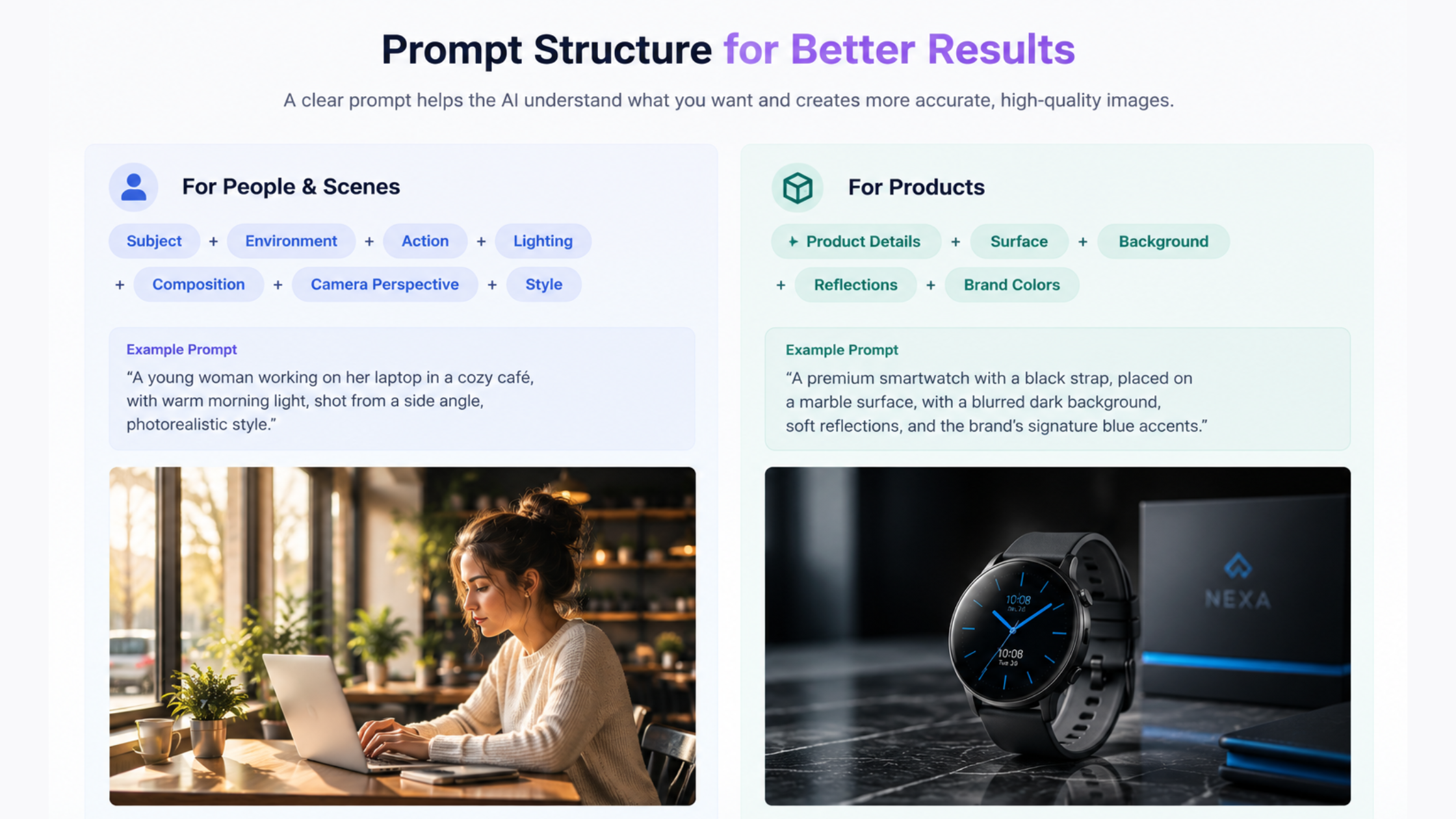
You don’t need an enormous paragraph for every generation.
Common Mistakes to Avoid
- Choosing based only on image quality: The prettiest image doesn’t necessarily make the best business tool.
- Ignoring consistency: One excellent image isn’t enough for a campaign that needs 30 related visuals.
- Forgetting licensing: Free AI generations don’t necessarily have the same commercial rights as paid generations.
- Giving vague prompts: A professional business image” gives the model too much room to interpret your intent.
- Using AI-generated products without checking them: Never assume a generated product photograph exactly represents the real product.
- Paying for too many subscriptions: Start with one tool that matches your workflow. Add another only when it solves a specific limitation.
Final Thoughts
The text-to-photo AI market has matured from simple prompt-to-image experiments into a much broader creative ecosystem.
The right tool depends on what you are making and how you plan to use the result. The most important lesson is that there is no universal winner.
A blogger generating two images a week doesn’t need the same platform as an advertising agency producing hundreds of campaign assets. An ecommerce company needs product accuracy. A developer needs an API. A brand needs clear commercial-use terms. A filmmaker may care more about character consistency and the ability to turn a still into a video.
So test the text-to-photos ai generators using your actual requirements, not generic benchmark prompts.
Generate the same product image, portrait, marketing scene, text-heavy graphic and complex composition across several platforms. Then compare quality, prompt accuracy, editing, consistency, licensing, speed, and cost per usable image. That will tell you far more about the best text-to-photo AI tool for your business than simply choosing the one with the biggest name.