![s[3]decode](https://s3decode.com/wp-content/uploads/2026/05/logo-s3decode.png)
You have a product idea, a rough wireframe, or even just a problem you want to solve but building the actual software can still take weeks or require a developer.
That’s where vibe coding has changed the development process.
Instead of manually writing every component, API, database query, and configuration file, you can describe what you want in plain English and let an AI coding tool build it with you. You can then ask for changes, test the result, fix errors, add features, and continue iterating.
But there is an important catch: not every AI coding tool is designed for the same kind of user or project.
A non-technical founder trying to build an MVP needs a very different tool from an experienced developer working inside a 200,000-line production codebase.
And that distinction matters even more in 2026. Recent research reviewing 47 sources on vibe coding found that the strongest evidence is around short-term productivity, prototyping, and UI development, while evidence around long-term maintainability and production-quality software is still limited.
So this guide doesn’t simply list popular AI coding tools. It explains what each tool does, who should use it, what you can build with it, where it falls short, pricing, and when you should choose something else.
What Is Vibe Coding?
Vibe coding is an AI-assisted software development approach where you describe your intended outcome in natural language and an AI system generates, modifies, or debugs the code required to achieve it.
For example, instead of manually creating a login page, database schema, API routes, validation, and dashboard, you could tell an AI:
“Build a SaaS application with email authentication. After login, users should see a dashboard showing their projects. Add a button to create a project and allow users to edit or delete their own projects.”
The AI can then generate much of the implementation. You review what it produced, explain what’s wrong or what should change, and continue the process.
That makes vibe coding iterative rather than magical.
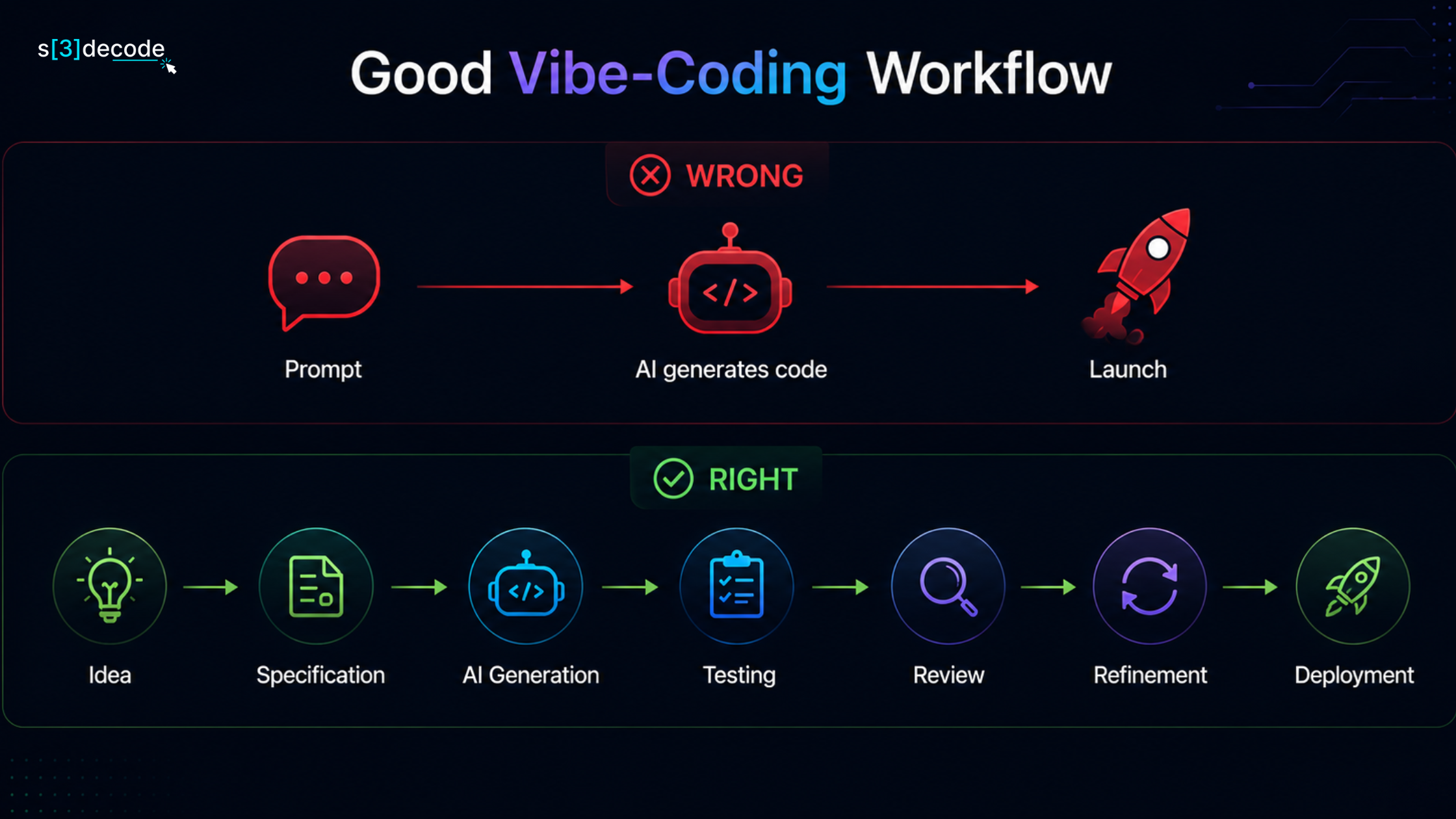
A 2026 multivocal literature review describes the process as a generation → evaluation → revision loop, with developers increasingly shifting from writing every line themselves toward specification, supervision, and validation.
This distinction is important because a good vibe-coding workflow isn’t:
The Best AI Vibe Coding Tools in 2026
The market has effectively split into several categories.
- AI app builders are designed to turn a prompt into a working application. Lovable, Bolt, v0, and Replit fall largely into this category.
- AI-native coding editors put AI directly into a development environment. Cursor and Windsurf are examples.
- Terminal-based coding agents work directly with repositories and development environments. Claude Code and Codex are prominent examples.
Here’s the quick comparison before we examine each one in detail:
| Tool | Category | Best For | Technical Level | Pricing Reference |
|---|---|---|---|---|
| Lovable | AI app builder | SaaS, MVPs, internal tools | Beginner–Intermediate | Free + paid plans |
| Cursor | AI code editor | Professional development | Intermediate–Advanced | $20/mo Pro |
| Replit Agent | AI app builder + cloud IDE | Build and deploy in one place | Beginner–Intermediate | $20/mo Core annually |
| Bolt.new | AI app builder | Fast web prototypes | Beginner–Intermediate | $25/mo Pro |
| v0 | AI app/UI builder | React, Next.js, UI-heavy apps | Beginner–Intermediate | Paid plans |
| Claude Code | Terminal coding agent | Complex codebases | Advanced | Usage/plan dependent |
| Windsurf | AI code editor | Agentic development | Intermediate–Advanced | Paid plans |
| OpenAI Codex | Coding agent | Software tasks and repository work | Intermediate–Advanced | Plan/usage dependent |
Pricing changes frequently, particularly because many tools now combine subscriptions with usage, credits, or tokens. The prices above should therefore be treated as a 2026 reference rather than a permanent price list.
1. Lovable – Best AI Vibe Coding Tool for Non-Technical Founders
Lovable is one of the closest examples of what most people imagine when they hear the term vibe coding.
Its core idea is simple: describe the application you want, and AI helps build it through conversation. You don’t have to start by opening a code editor or setting up a development environment.
For example, you could write:
“Create a customer portal for a SaaS company. Customers should be able to log in, view their subscription, see invoices, update their profile, and contact support.”
Lovable can turn that requirement into a working web application and then continue modifying it based on your instructions.
What can you build with Lovable?
Lovable is particularly suitable for applications such as:
- SaaS MVPs
- Customer portals
- Admin dashboards
- CRM prototypes
- Internal business tools
- Booking systems
- Landing pages
- Content management interfaces
- CRUD applications
- Simple marketplaces
- Business dashboards
The important advantage is that you can start with the business requirement rather than the technical implementation. A founder doesn’t necessarily need to know how to structure React components or configure a backend before seeing a working version.
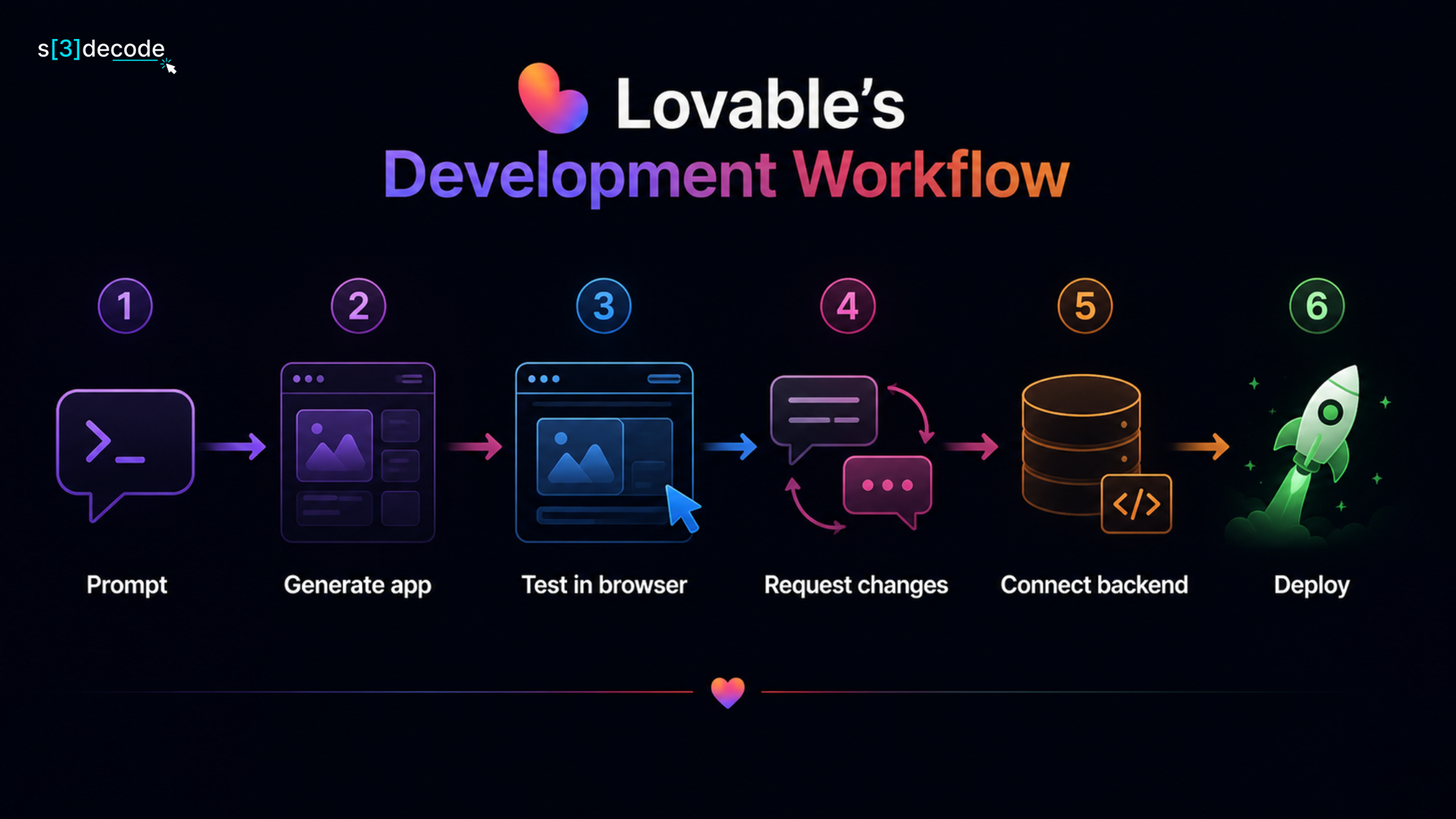
Lovable’s development workflow
A typical project might look like this:
Backend and integrations
Lovable isn’t only about generating frontend screens. Its current platform supports application building, hosting, and integrations, while its pricing system uses credits based on usage and task complexity. Lovable’s documentation gives examples ranging from small UI changes to authentication and full landing-page generation, with different credit consumption depending on the task.
It also provides an important advantage for business users: Lovable states that users own the code and projects they create, subject to third-party rights in underlying models.
Lovable pricing
Lovable offers a free starting option, with paid plans based around credits and workspace capabilities. Because credit consumption varies according to the complexity of the request, comparing Lovable only by monthly subscription price can be misleading.
For example, asking the AI to change a button can consume dramatically fewer credits than asking it to implement authentication.
- The Biggest Advantage: This is why Lovable is particularly interesting for founders and small businesses.
- The Biggest Limitation: The easier it becomes to generate software, the easier it becomes to generate poorly understood software.
If you don’t understand databases, authentication, permissions, security, or deployment, you may not recognize problems in the generated application.
So Lovable is excellent for getting started, but production applications still need proper testing and technical review.
Best for
Non-technical founders, marketers, designers, startups, small businesses, and anyone who wants to turn an idea into a working web application quickly.
Lovable has also become a major player in the AI coding market. In August 2026, the company announced a $400 million funding round at a reported $13.3 billion valuation, illustrating how quickly the AI software-building market has grown.
2. Cursor – Best for Professional AI-Assisted Development
Cursor is fundamentally different from Lovable. Instead of primarily asking:
“Build me an application.”
you’re more likely to ask:
“Help me modify and improve this existing application.”
Cursor is an AI-powered code editor built around a developer workflow. It is based on the VS Code ecosystem, making the environment familiar to many developers. You can open an existing repository, let the AI understand the codebase, and ask it to perform multi-file tasks.
For example:
“Find all places where the application handles user authentication. Replace the old authentication middleware with the new service and update the related tests.”
That’s much closer to real software engineering than simple prompt-to-app generation.
What makes Cursor different?
Cursor provides AI capabilities throughout the coding workflow, including agentic development, code generation, codebase interaction, background agents, and debugging-oriented features.
Its current Pro plan is $20/month, while higher individual and team plans provide substantially greater usage and additional capabilities.
Cursor also introduced Cursor Start in India at ₹649/month, with access to its Composer and selected models, cloud agents, and other capabilities.
What can you build with Cursor?
Almost anything that you could build using a normal development environment:
- SaaS platforms
- E-commerce applications
- APIs
- Mobile backends
- Enterprise applications
- React applications
- Next.js applications
- Python systems
- Node.js applications
- Data processing tools
- Automation systems
The key difference is that you have much more control over the underlying codebase.
The Advantages:
Cursor becomes particularly valuable once the project is too complicated for a simple app builder. Imagine your application has:
- 150 components
- 50 API endpoints
- Multiple database tables
- Authentication
- Payment processing
- Automated tests
- CI/CD
- Several developers
At this point, being able to work directly inside the repository becomes extremely valuable.
The Disadvantages
You need more technical knowledge. If you’re a complete beginner, Cursor can generate code, but you may struggle to understand whether the changes are architecturally correct.
That’s a critical distinction: Cursor can help an experienced developer move faster. It doesn’t automatically turn a beginner into an experienced software engineer.
Best for
Professional developers, technical founders, software teams, and people maintaining existing codebases.
3. Replit Agent – Best for Building, Testing and Deploying in One Place
Replit is interesting because it combines several pieces of the development process into one platform. You can use AI to generate software, edit the project, run it, test it, and deploy it without configuring a traditional local development environment.
That makes Replit particularly appealing to beginners and solo builders.
How Replit Agent works
You can describe what you want to build:
“Create a project management application with user accounts, projects, tasks, due dates, team members, and a dashboard showing overdue tasks.”
The agent can work through the implementation and continue making changes based on your feedback. The important difference is that the development environment is already there. You don’t necessarily need to spend time configuring:
- Runtime versions
- Local servers
- Deployment
- Hosting
- Environment setup
What can you build?
Replit is broader than many browser-only app generators. It can be useful for:
- Web applications
- Python projects
- APIs
- Automation scripts
- Bots
- Data applications
- Backend services
- Educational projects
- SaaS prototypes
Its multi-language flexibility can make it more attractive when you’re not committed to a JavaScript-only stack.
Replit pricing in 2026
Replit currently offers a free Starter tier, while Core is $20/month when billed annually and includes $25 in monthly credits. Its Pro plan is positioned for commercial and professional development and is listed at $100/month, or $95/month when billed annually.
Replit also introduced a more clearly differentiated Pro plan in 2026, including larger credit allowances, more agent capacity, collaboration features, and additional support.
- The Biggest Advantage: You can go from idea to deployed application without assembling a large toolchain yourself.
- The Disadvantage: The all-in-one approach can be less appealing to developers who already have a sophisticated local development environment and want complete control over their infrastructure.
Best for
Beginners, students, solo founders, educators, prototypes, and developers who want an integrated development and deployment environment.
4. Bolt.new – Best for Fast Web Application Prototypes
Bolt.new is designed around a straightforward proposition:
Describe the application → generate it → modify it in the browser.
It is particularly useful when you want to get a functional web application in front of someone quickly. Imagine you’re a startup founder validating an idea for a customer feedback platform. Instead of spending several days creating the first version, you could ask Bolt to create:
- A landing page
- User registration
- A feedback dashboard
- Feedback submission
- Voting
- Admin controls
You can then continue refining the application through prompts.
Bolt’s technology flexibility
One reason Bolt is useful is that it isn’t limited to a single type of application architecture. Its current platform supports web development workflows and gives users hosting, databases, file uploads, custom domains, and other capabilities depending on the plan.
Bolt pricing
Bolt currently offers a free plan with a daily token limit and a monthly token allowance. Its Pro plan is $25/month, with no daily token limit, a starting allocation of 10 million tokens per month, hosting, custom domains, higher request limits, and other features. This makes Bolt’s pricing model particularly important to understand.
What is Bolt best at?
Bolt is a strong option for:
- Startup prototypes
- Marketing websites
- SaaS concepts
- Interactive dashboards
- Web tools
- Proof-of-concept applications
- UI experiments
The limitation
The experience can become more complicated as the application grows. A small project with 10 pages is very different from a production application with hundreds of components, complicated business logic, multiple integrations, and strict security requirements.
Best for
Founders, designers, marketers, freelancers, and developers who want to prototype web applications rapidly.
5. v0 – Best for AI-Generated UI and React Applications
v0, created by Vercel, has a particularly strong position in UI generation and React/Next.js development. If your main challenge is:
“I know what this interface should look like, but I don’t want to manually code the entire thing.”
v0 is worth considering.
Example
You could ask:
“Create a SaaS analytics dashboard with a left navigation menu, revenue chart, customer growth chart, recent transactions, date filters, and a responsive mobile layout.”
Instead of starting with a blank file, you get a generated interface that you can refine.
Where v0 excels
v0 is particularly useful for:
- SaaS dashboards
- Landing pages
- Pricing pages
- Admin interfaces
- React components
- Next.js projects
- Design prototypes
- Responsive layouts
It can dramatically reduce the amount of time required to go from design concept → frontend implementation.
Why developers like the approach
The generated interface can become part of a real development workflow rather than remaining a static mockup. That matters for teams that already use React, Next.js, and Vercel.
The tradeoff
If your main requirement is complex backend architecture, v0 shouldn’t necessarily be your only development tool. Its biggest strength is the interface and application-building side, not replacing every part of a mature engineering stack.
Best for
Frontend developers, designers, SaaS companies, React developers, and teams already using the Vercel ecosystem.
6. Claude Code – Best for Developers Working With Real Codebases
Claude Code belongs to a different category from Lovable and Bolt. It is a terminal-based coding agent designed to work directly with your development environment and repository. This makes it particularly powerful for experienced developers.
You can give it tasks such as:
“Analyze this repository and identify why the API response time increased after the latest feature. Check the database queries, run the relevant tests, and propose a fix.”
The agent can inspect files, reason about the project, modify code, and work through development tasks.
Why Claude Code is different
A visual app builder tries to hide much of the technical complexity. Claude Code does almost the opposite. It gives an AI agent access to a developer’s actual environment.
That means it can be extremely useful for:
- Refactoring
- Debugging
- Writing tests
- Understanding unfamiliar codebases
- Implementing features
- Updating dependencies
- Fixing bugs
- Working with Git
- Automating development tasks
The biggest Advantage
Claude Code becomes particularly valuable when the code already exists. Suppose you’ve inherited a five-year-old application with hundreds of thousands of lines of code. You don’t want an AI to generate a new application.
You want an AI that can understand the existing application and make targeted changes without breaking unrelated functionality. That’s where terminal agents become more compelling.
The tradeoff
Claude Code requires considerably more technical understanding than Lovable or Replit.
You should be comfortable with:
- Terminal commands
- Git
- Files and directories
- Dependencies
- Application architecture
- Testing
Best for
Experienced developers, engineering teams, technical founders, and large existing repositories.
7. Windsurf – Best AI-Native Alternative to Cursor
Windsurf is another AI-first development environment designed to make AI a central part of the coding workflow. Like Cursor, it is aimed more at developers than complete beginners.
Its agentic capabilities can help developers plan and execute multi-step changes instead of simply generating individual lines of code.
What can Windsurf help with?
You can use it for:
- Code generation
- Debugging
- Refactoring
- Multi-file changes
- Project understanding
- Code completion
- Agentic development
- Existing application maintenance
Its value becomes clearer when you’re working on a project that has enough complexity that copying code from a chatbot is no longer practical.
Windsurf vs Cursor
The two tools overlap significantly. Both are trying to solve the same fundamental problem: How can an AI understand a developer’s project and participate directly in software development?
The difference often comes down to workflow preference, model availability, interface, agent behavior, and pricing. A developer who prefers Cursor doesn’t necessarily need to switch just because another tool has a particular feature.
Best for
Developers who want an AI-native coding environment and an alternative to Cursor.
8. OpenAI Codex – Best for Agentic Software Tasks
OpenAI Codex has increasingly moved toward an agentic software-development model. Instead of only answering questions such as:
“How do I write this function?”
the focus is increasingly on giving the agent a development task and allowing it to work through the repository and produce changes. This makes Codex more relevant to workflows such as:
- Feature implementation
- Bug fixing
- Code review
- Repository tasks
- Test generation
- Refactoring
- Pull-request workflows
- Background development tasks
Codex pricing in 2026
Codex pricing has changed significantly during 2026. OpenAI moved Codex toward token-based pricing rather than a simple per-message model for relevant ChatGPT plans.
OpenAI also introduced pay-as-you-go Codex-only seats for certain team workflows, with usage billed according to token consumption. That means you should evaluate Codex based on actual expected usage, not simply compare its subscription price with a $20 coding editor.
Where Codex fits
Codex is particularly attractive when you’re already working within the OpenAI ecosystem and want coding agents to become part of your development workflow.
The tradeoff
As with Claude Code, Codex becomes considerably more useful when the person supervising it understands software engineering. An agent can implement a technically valid solution that isn’t the best solution for your application’s architecture.
Best for
Developers, technical teams, and organizations experimenting with agentic software engineering.
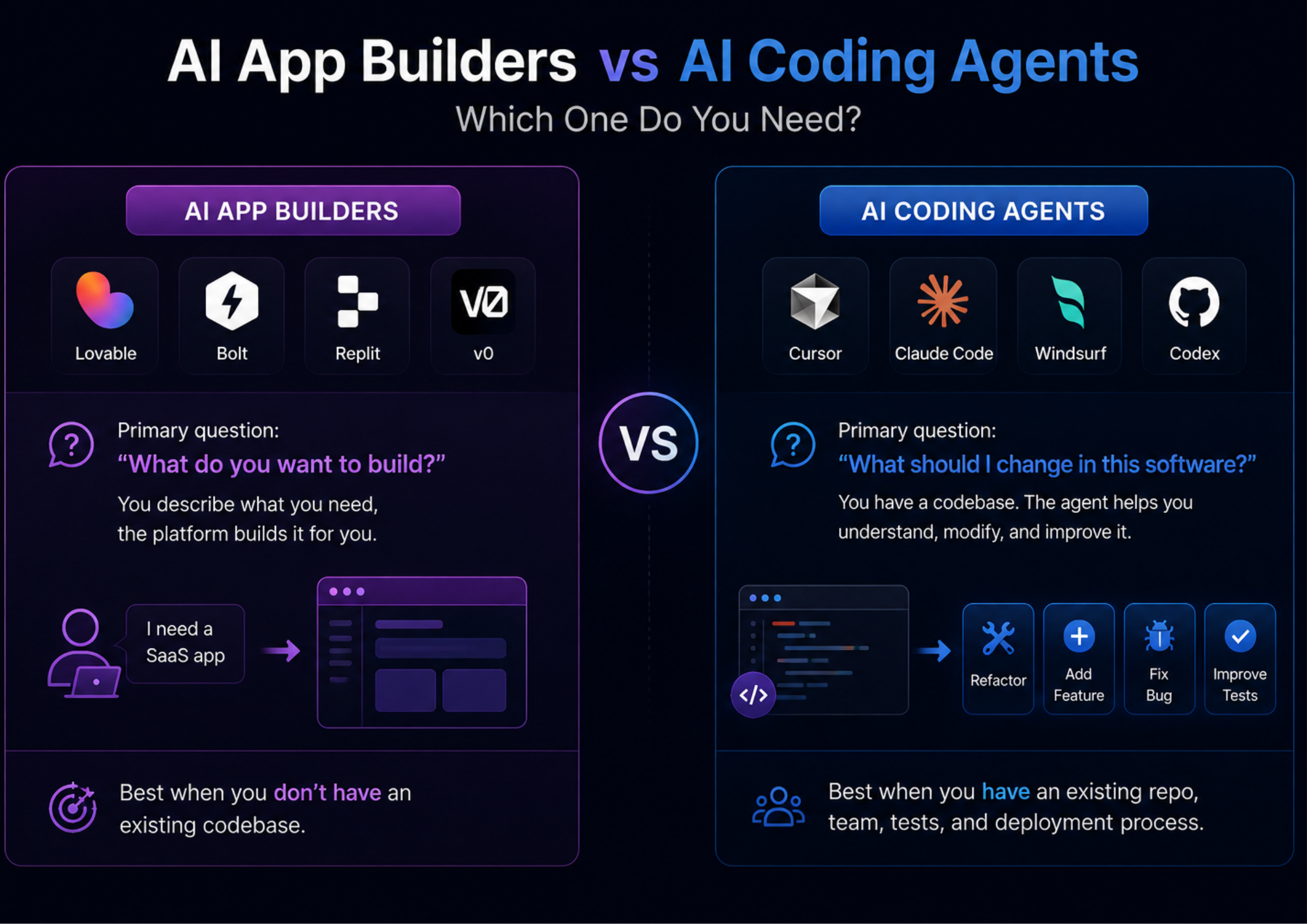
AI App Builders vs AI Coding Agents: Which One Do You Need?
This is one of the most important decisions when choosing a vibe coding tool. Many people compare Lovable against Cursor as though they’re direct competitors.
They’re not really solving the same problem.
The practical approach
You don’t necessarily have to choose one. A startup could use Lovable for the MVP, then Cursor for development and then Claude Code/Codex for Automated engineering tasks That’s increasingly becoming a realistic workflow as AI coding tools mature.
Best AI Vibe Coding Tool Based on Your Experience
Your technical skill should influence your choice.
| Your Experience | Recommended Tools | Why |
|---|---|---|
| No coding experience | Lovable, Replit | Minimal setup |
| Beginner | Lovable, Bolt, Replit | Prompt-driven development |
| Designer | v0, Lovable | Strong UI generation |
| Freelancer | Bolt, Cursor | Prototyping + development |
| Technical founder | Lovable + Cursor | Fast MVP + code control |
| Junior developer | Cursor, Windsurf | Learn while coding |
| Experienced developer | Cursor, Claude Code | Existing codebase work |
| Engineering team | Cursor, Claude Code, Codex | Agentic development |
| Large codebase | Claude Code, Cursor, Codex | Repository-level work |
Best AI Tool for Different Types of Projects
The project itself should also influence your decision.
- Building a startup MVP, You can try Lovable or Bolt (You want speed, experimentation, and low setup overhead.)
- When building a SaaS application, you can try Lovable, then Cursor. (Use an app builder for early validation, then move into a developer-oriented environment as the product becomes more complex.)
- Building a React/Next.js product, you can try v0 + Cursor. (v0 can accelerate interface creation, while Cursor can handle deeper application development.)
- Building an internal business tool, you can try Lovable or Replit. (If your team needs a CRM, dashboard, approval system, reporting tool, or workflow application, these platforms can reduce development time significantly.)
- Maintaining an existing application, you can try Cursor or Claude Code. (An AI app generator isn’t the obvious choice when the application already exists.)
- Large production codebase, you can try Claude Code, Cursor, or Codex. (You need tools that can understand repositories, work across multiple files, run tests, and make controlled changes.)
How Much Do AI Vibe Coding Tools Cost in 2026?
A tool may advertise itself at $20 or $25 per month, but the actual amount you spend depends on how heavily you use AI.
For example:
- Cursor Pro is $20/month, with additional usage and different limits depending on the plan.
- Replit Core is $20/month when billed annually, with $25 of monthly credits.
- Bolt Pro is $25/month, with usage measured partly through tokens.
- Lovable uses credits whose consumption varies according to the task.
- Codex uses token-based usage under its current pricing model.
So a better comparison is:
Monthly subscription + AI usage + hosting + database + deployment + additional credits
For a simple personal project, $20–$30 may be enough. For intensive development, the AI usage can become a meaningful part of your monthly software budget.
What Can You Actually Build With Vibe Coding?
The answer is broader than simple landing pages. In 2026, AI coding tools can help create:
Business applications
- CRM systems
- Inventory dashboards
- Employee portals
- Reporting systems
- Booking platforms
- Customer portals
SaaS products
- Subscription dashboards
- Analytics platforms
- Project management tools
- Collaboration applications
- AI-powered utilities
Developer tools
- APIs
- Automation scripts
- Internal CLI tools
- Data-processing applications
- Testing utilities
Consumer applications
- Social platforms
- Productivity apps
- Educational tools
- Marketplaces
- Community applications
However, being able to generate an application doesn’t mean the application is automatically production-ready. That’s the distinction many beginners miss.
The Biggest Disadvantage of Vibe Coding
The biggest risk isn’t that AI can’t code. The bigger problem is that it can generate code that looks convincing while containing problems you don’t notice.
For example, an AI-generated application might work perfectly when you test it with one account. But what happens if:
- A user accesses another user’s data?
- Someone manipulates an API request?
- 10,000 users access the application simultaneously?
- A payment fails halfway through?
- The database contains millions of records?
- An API key accidentally appears in frontend code?
- An AI-generated dependency becomes vulnerable?
- A database migration destroys production data?
These aren’t problems that can be solved simply by saying: “Make it better.” They require engineering judgment. Recent research supports this caution: evidence of vibe coding’s benefits is currently strongest for prototypes and user-interface work, while evidence for long-term maintainability and safety-critical production use remains limited.
Security Should Be a Priority
This is particularly important for founders and small businesses. If you’re using vibe coding to build an application that handles customer information, payments, employee data, or business records, don’t assume that the generated code is secure.
Pay particular attention to:
- Authentication: Who can log in?Authorization: What is each user allowed to access?
- Database security: Can one user query another user’s data?
- Secrets: Are API keys stored securely?
- Input validation: Can malicious input reach the database or application logic?
- Dependencies: Are third-party packages trustworthy and maintained?
- Payments: Are payment events validated server-side?
For a prototype, some of these concerns may be acceptable temporarily and for a production application handling real customers, they are not optional.
How to Vibe Code Properly
The best results usually come from treating the AI like a very fast junior developer rather than an all-knowing software architect. Start by explaining the business requirement.
Then define:
- What the application should do
- Who will use it
- What data it needs
- What users are allowed to do
- What happens when something goes wrong
- What technology you want to use
- How success will be tested
Then ask the AI to create a plan before asking it to implement everything. For example, instead of:
“Build a complete e-commerce website.”
Try:
“I want to build an e-commerce application for a small clothing brand. Customers should browse products, filter by size and category, add products to a cart, create an account, and place orders. Admins should manage products and orders. Before writing code, propose the architecture, database schema, authentication approach, and major components.”
That’s a much better starting point.
Don’t Build Everything in One Prompt
This is one of the most important practical rules. Instead of asking an AI agent to build a 30-feature application in one go, divide the project using the phases in the reference image below.
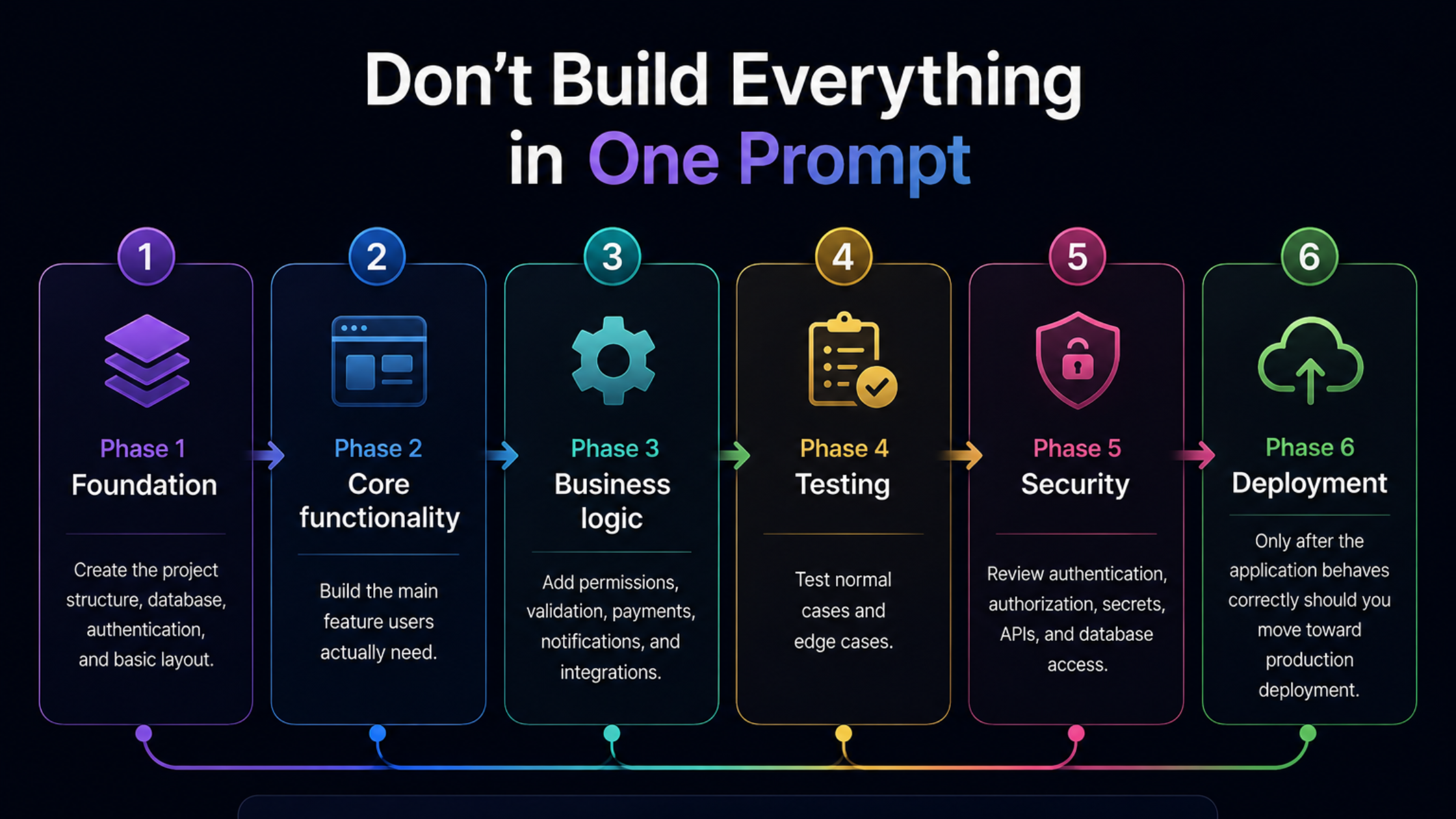
This approach gives you much more control over what the AI changes.
Vibe Coding vs Traditional Development
The biggest difference between vibe coding and traditional software development isn’t simply who writes the code. It is how software moves from an idea to a finished product.
Traditional development has historically relied on clearly defined requirements, technical planning, architecture, implementation, testing, code review, and controlled deployment. Vibe coding shifts more of the implementation and problem-solving process to AI, allowing people to describe outcomes, evaluate generated work, and iterate much faster.
That changes the economics and workflow of development but it doesn’t remove the need for engineering judgment.
| Factor | Traditional Development | Vibe Coding |
|---|---|---|
| Starting point | Requirements and technical specifications | Natural-language goals and product requirements |
| Development speed | Usually slower during initial implementation | Much faster for prototypes and straightforward features |
| Role of developer | Writes, designs, tests, and maintains software | Directs AI, reviews decisions, validates output, and handles complex engineering |
| Prototyping | Requires meaningful development effort | Can often produce a usable prototype very quickly |
| Architecture | Usually designed deliberately before implementation | AI can propose architecture, but human oversight becomes critical |
| Iteration | Changes may require additional development cycles | Product changes can often be requested conversationally |
| Testing | Structured testing is normally part of the development lifecycle | AI can generate tests, but independently verifying results remains essential |
| Security | Security practices can be incorporated into established processes | Security can be overlooked if AI-generated functionality isn’t properly reviewed |
| Scalability | Designed around expected technical and business requirements | Early versions may prioritize speed and require architectural refinement later |
| Best suited for | Complex, regulated, long-term, and mission-critical systems | Prototypes, MVPs, experiments, internal tools, and accelerated development |
| Human involvement | High throughout implementation | Often shifts toward specification, supervision, review, and decision-making |
The biggest shift is from code production toward specification and validation. This is also consistent with the 2026 literature review, which found that developers’ roles increasingly move toward specifying intent, supervising generation, and validating results.
Which AI Vibe Coding Tool Should You Choose?
Here’s the simplest decision framework:
Choose Lovable if…
You have an idea but little coding experience and want to create a working web application quickly.
Choose Cursor if…
You’re a developer who wants AI deeply integrated into an existing codebase.
Choose Replit if…
You want development, AI, hosting, and deployment in one environment.
Choose Bolt if…
Your priority is rapid web application prototyping.
Choose v0 if…
Your project is heavily focused on React, Next.js, and polished user interfaces.
Choose Claude Code if…
You’re comfortable with the terminal and need an AI agent that can work deeply with an existing repository.
Choose Windsurf if…
You want an AI-native coding environment and an alternative to Cursor.
Choose Codex if…
You want an agentic coding workflow integrated with the OpenAI ecosystem and repository-based development.
Final Verdict: What Is the Best AI Tool for Vibe Coding in 2026?
The right choice depends on what you’re building and how much technical control you need. The bigger lesson is that vibe coding is no longer a single category. The market has divided into app builders, AI-native editors, and autonomous coding agents, each targeting a different stage of software development.
And that is probably the most useful way to think about these tools in 2026.
Vibe coding can dramatically reduce the time between an idea and a working product. But speed is only valuable when the software you build is secure, maintainable, and actually solves a problem.